Author: Madhammer

  • Ninety Seconds or Ninety Hours: How Session Length Shapes a Game

    Most of what gets reviewed on this site is built to be lived in. An MMORPG expects a few hundred hours. An action RPG expects dozens. Even the shorter recommendations assume you will sit down with intent, for a stretch, more than once.

    There is an entire category of game that assumes the opposite: that you have ninety seconds, that you are standing up, and that you may not come back today. That constraint produces design decisions so different from the ones we normally discuss that the two barely share a vocabulary, and comparing them properly turns out to explain both.

    Session length is a design constraint, not a genre

    The length of a typical session decides almost everything downstream. It sets how long a reward loop can be, how much the game can expect you to remember between sittings, how complex the controls can get, and how much of the screen can be given to information rather than to action.

    A raid expects you to have internalised a rotation, coordinated with others, and committed two hours. It can therefore build tension over forty minutes, because it knows you are there. A game built for a ninety-second window cannot borrow against your attention in that way. Whatever it is going to deliver, it has to deliver inside the window.

    This is why short-session design tends toward rounds rather than campaigns. A round is self-contained: it starts, resolves and pays out without reference to anything that happened before it, which is the only structure that survives being interrupted.

    What the game has to remember

    Long-form games carry enormous amounts of state. A character, a position in the world, an inventory, a quest log, reputations, cooldowns, a half-finished conversation with somebody in a town you have not visited for a week. Saving and restoring that is a substantial engineering problem, and much of what makes a return to an MMO feel heavy is simply the weight of reloading your own context.

    Short-round platforms carry almost none of it. Between sessions there is no world to restore, because nothing was left standing. What persists is a ledger: what you have, what happened, what you are owed.

    You can see this clearly in how such platforms describe their own accounts. The OK Win login page sets out what the account consists of in three items: a wallet, a win history and rewards. No character, no inventory, no position in a world. That is not a thin description of a game account; it is a complete description of a different kind of object.

    Once you notice that, the design follows logically. There is no load screen worth the name because there is nothing to load. There is no tutorial in the MMO sense because there is no system to teach, only a rule panel per round. And the interface can afford to be mostly a single button, because a single button is all the interaction a round requires.

    Reward cadence is the real divide

    In a long game, rewards are deliberately spaced. The dungeon that drops the item you want is gated behind a week of preparation, and that spacing is what gives the item meaning. Designers talk about this openly: compress the schedule and the reward stops registering.

    Short-round design cannot use spacing, because there is no week to spread anything across. The resolution has to arrive at the end of each round, every time. That is a harder design problem than it looks, and it is why so much of the craft in that category goes into the few seconds between the input and the result rather than into content.

    It also explains why the two categories feel so different even when the underlying activity is similar. A loot drop at the end of a forty-minute raid and a result at the end of a ninety-second round are both outcomes. One of them has been earned across a schedule you helped build. The other arrives on its own schedule, repeatedly, and the repetition is the point.

    Interruption tolerance

    A design built for short sessions has to assume interruption as the normal case rather than the exception. Someone speaks to you, the bus arrives, the screen locks. Anything that cannot survive that will be abandoned.

    Long-form games handle interruption badly and largely admit it. Dropping out of a group activity has social consequences, and the apology for it is built into the culture of the genre. Short-round design has no equivalent, because there is no group and no commitment to break.

    This is also the quiet reason the two formats rarely appeal to the same mood in the same person. It is not about depth or seriousness. It is about whether, at that moment, you can promise the game anything at all.

    What each format asks of you

    The honest way to compare them is by what they ask for, and they ask for genuinely different things.

    • Long-form play asks for time in continuous blocks, and for memory between sessions.
    • Short-round play asks for frequency rather than duration, and remembers nothing on your behalf.
    • Long-form play builds value through accumulation, which makes leaving feel expensive.
    • Short-round play resets to zero each time, which makes leaving cost nothing and returning cost nothing.
    • Long-form monetisation usually attaches to progression; short-round monetisation attaches to the round itself.

    That last point is where the comparison gets genuinely interesting, and it sits next to the long-running argument about paying to win against paying to progress. In a progression game, money buys a position on a curve you were already climbing. Where the unit of play is a self-contained round, there is no curve to buy a position on, and the relationship between money and play has to be built some other way.

    Difficulty does not mean the same thing in both

    In long-form play, difficulty is usually a skill gate. The encounter is beatable, you are not yet good enough, and the game is betting that you will close that distance. Everything about the genre’s culture follows from that bet: guides, practice, the vocabulary of progression.

    Short-round formats cannot lean on that, because there is no room to build mastery inside ninety seconds and no continuity between attempts in which to practise. Whatever makes one round different from the next has to come from the rules of that round or from variance, not from the player getting better across a season.

    This is the single biggest source of confusion when people from one format evaluate the other. A long-form player looks at a short round and sees an absence of skill expression, and they are right, but it is a consequence of the format rather than a failure within it.

    The formats are already borrowing from each other

    The neat division above is less tidy in practice, because long-form games have spent a decade importing short-session design and mostly not calling it that.

    Daily quests, login streaks, weekly chests and the five-minute “just do my dailies” routine are all short-session structures grafted onto games that otherwise expect hundreds of hours. They exist to give the player something completable on a day when the two-hour block never materialised, and they work for exactly the reason the short-round format works.

    The traffic runs the other way too. Platforms built on rounds have steadily added the things long games use to create continuity: histories, streaks, levels, seasonal events. Each of those is an attempt to make something persist across sessions that were designed not to need it.

    So the useful mental model is not two separate species but a single axis, with most things sitting somewhere in the middle and borrowing in both directions. What differs is which end a design started from, and that origin usually remains legible no matter how much gets bolted on afterwards.

    Reading which one you are signing up for

    The signals are usually visible before you commit anything. A game that wants hundreds of hours advertises depth: systems, classes, progression trees, the promise of mastery. A platform built on rounds advertises immediacy: speed of sign-in, speed of resolution, how little stands between opening the app and a result.

    Neither description is dishonest. They are accurately describing what their respective formats are good at, and the mistake is reading one set of promises with the other set of expectations.

    The sign-up flow is often the clearest tell of all. A long-form game spends your first ten minutes on character creation, because the thing you are making is the thing you will carry. A short-round platform spends them on an account, a balance and a way back in, because those are the only things that persist.

    Why the comparison is worth making at all

    It is tempting for anyone who mainly plays long-form games to treat short-session design as a lesser version of the same craft. It is not. It is a different craft working against a much harder constraint, and some of its solutions are genuinely elegant.

    What matters is knowing which constraint a thing was built under before judging it, because almost every criticism that sounds devastating in one direction turns out to be a category error. Shallow is the correct design for ninety seconds. Slow is the correct design for ninety hours. The failure is only ever in the mismatch between the format and the moment you brought to it.
  • How to read game reviews: 7 Smart Tips to Avoid Bad Buys in 2026

    How to read game reviews: 7 Smart Tips to Avoid Bad Buys in 2026

    Knowing how to read game reviews is the difference between a purchase you play for months and a refund request two hours in. A single number rarely tells you whether a game suits your hardware, your budget or your taste. This guide shows you how to pull real buying signals out of critic scores, aggregates and player ratings.

    how to read game reviews — infographic

    Why a single score misleads

    A score is a compression. A reviewer spends 20, 40 or 100 hours with a game, forms a nuanced opinion, and then squeezes it into one figure. Everything that made the opinion useful (what they liked, what annoyed them, what hardware they used) gets lost unless you read the text.

    Scales also differ between outlets. Some use 10 points, some use 5 stars, some use no score at all. A 7/10 at one publication can mean “good, recommended”, while another outlet treats anything under 8 as a warning. That is the first lesson in how to read game reviews well: learn the outlet’s scale before you judge the number.

    • Genre bias: a strategy specialist and a generalist will score the same 4X game very differently.
    • Expectation framing: sequels are judged against their predecessors, new IP against the genre.
    • Price framing: a 6/10 at full price may be a great pick at a deep discount or inside a subscription.

    That last point matters more every year. If a game sits in a subscription library, the cost of trying it drops to nearly zero, which changes how much a middling score should worry you. Our breakdown of whether Game Pass is worth it in 2026 covers that trade-off in detail. Age ratings are a separate signal from review scores: the ESRB ratings guide explains what each label and content descriptor actually means.

    Critic scores vs aggregate scores

    An individual critic review is one informed opinion. An aggregate site collects many of those opinions and turns them into a single average. Both are useful, but for different jobs. The critic tells you why; the aggregate tells you how many people agree.

    Are Metacritic scores reliable?

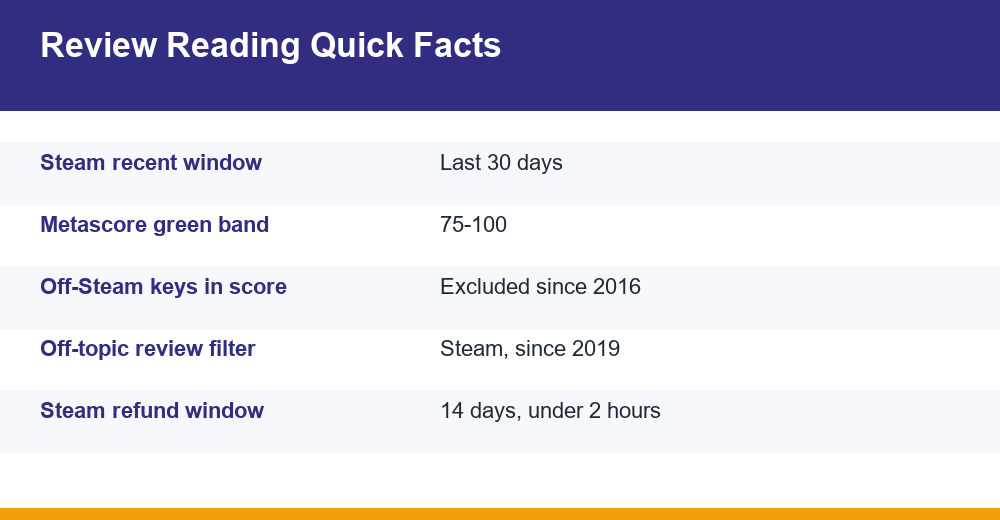
    Metacritic’s Metascore is a weighted average of critic scores, and the site does not publish how much weight each outlet carries. For games, the colour bands are green for 75-100, yellow for 50-74 and red for 0-49. The Metascore is reliable as a broad consensus signal, but it flattens disagreement: a game that half the critics loved and half disliked can land on the same number as one everybody found merely fine.

    OpenCritic takes a different approach, showing a Top Critic Average plus the percentage of critics who recommend the game. That “percent recommended” figure is often more useful than the average, because it tells you how many reviewers would actually tell a friend to buy it.

    SignalWhat it tells youMain weakness
    Single critic reviewDetailed reasoning, specific pros and consOne person’s taste and hardware
    MetascoreBroad critic consensusHidden weighting, hides disagreement
    OpenCritic % recommendedShare of critics who would recommendDepends on outlet coverage
    Steam user ratingShare of buyers who liked itProne to swings, short reviews
    Steam recent ratingCurrent state after patchesSmall sample for niche games

    If you are wondering how to read game reviews without being misled by an average, the practical move is simple: use the aggregate to decide whether a game deserves a closer look, then read three or four individual reviews, ideally including one positive, one negative and one from an outlet that covers your preferred genre.

    What Steam review ratings mean

    Steam shows a summary label built from the share of positive user reviews. Every Steam review is a simple thumbs up or thumbs down, so the label measures how many players recommend the game, not how highly they rate it.

    The thresholds below are the commonly observed breakpoints. Valve does not publish a formal table, so treat them as approximate.

    LabelApprox. positive shareTypical review count
    Overwhelmingly Positive95% or more500+
    Very Positive80% or more50+
    Positive80% or more10-49
    Mostly Positive70-79%10+
    Mixed40-69%10+
    Mostly Negative20-39%10+
    Negative / Very Negative / Overwhelmingly NegativeUnder 20%Scales with count

    Recent vs all-time ratings

    Steam splits the score into Recent Reviews (the last 30 days) and All Reviews. This split is one of the most valuable tools you have. A game that launched broken may show “Mixed” all-time but “Very Positive” recently after a year of fixes. The opposite also happens: a beloved game can slide after a bad update, a monetisation change or dropped support.

    • Recent much higher than all-time: the game has likely improved since launch.
    • Recent much lower than all-time: something changed. Read the newest reviews to find out what.
    • Very few recent reviews: the signal is noisy, so lean on the all-time figure.

    Two more details help. Since 2016, reviews from players who activated a key bought outside Steam no longer count toward the headline score, which cuts down on easy manipulation. And you can filter reviews by language, by purchase type and by playtime, so you can read what people with 50+ hours think rather than first-impression rants.

    What is review bombing?

    Review bombing is a coordinated wave of negative user reviews, usually posted in a short window, that targets something other than the game itself. Common triggers include a publisher’s business decision, a store exclusivity deal, a controversial statement or a pricing change in a region.

    Not every flood of negative reviews is a bomb. Players hammering a game for crashing on launch day, or for a new pay-to-win shop, are reviewing the product honestly. The question is whether the complaints describe the experience of playing.

    How platforms handle it

    Since 2019, Steam has flagged periods of off-topic review activity. When Valve confirms a burst is unrelated to the game, those reviews are excluded from the score by default, though you can opt to include them in your store settings. Steam also shows a review histogram, so you can see spikes with your own eyes.

    Metacritic added a waiting period before user reviews open on new game releases, giving people time to actually play first. That does not stop bombing, but it slows the launch-day pile-on.

    1. Open the review histogram and look for a sharp spike over a few days.
    2. Read a sample of reviews from that spike.
    3. Check whether they mention gameplay, performance or content.
    4. If they mostly cite news or company decisions, discount them for buying purposes.

    Positive bombing exists too. Fans sometimes flood a game with praise to counter a negative wave, so apply the same scepticism in both directions.

    Paid coverage is not automatically dishonest, but you deserve to know about it. In many markets, advertising rules require clear disclosure when a creator is paid or given something of value in return for coverage.

    How can you tell if a game review is sponsored?

    • Look for disclosure labels: “sponsored”, “paid partnership”, “#ad” or “in partnership with” near the top of the article or video description.
    • Check the tone: no criticisms at all, marketing phrases lifted from press releases, or a heavy focus on a pre-order bonus are warning signs.
    • Watch for affiliate pushes: repeated buy links and discount codes signal a commercial interest, even when disclosed.
    • Compare with other outlets: a review far above the consensus with no clear reasoning deserves a second look.

    Keep one distinction in mind. Most critics receive review codes from publishers, meaning a free copy for testing. That is standard practice and not the same as sponsorship. Good outlets state when a code was provided and, ideally, what platform they played on.

    Live-service and free-to-play titles attract the most influencer deals, because publishers need ongoing attention. If you are choosing among them, our list of the best free-to-play games of 2026 focuses on what you actually get without spending.

    Patch state and timing context

    Modern games change after release, sometimes dramatically. A review written on launch week describes the launch build. Six months later, performance, balance and even core systems may be different.

    Part of knowing how to read game reviews is finding out which version was tested. Strong reviews mention the patch number or date, the platform, and the hardware. A PC review without CPU, GPU and resolution details tells you little about how the game will run on your machine.

    Review timingWhat to expectHow to use it
    Pre-launch (embargo)Pre-release build, may lack day-one patchGood for design and story, weaker on performance
    Launch weekReal-world bugs and performanceBest snapshot of the launch state
    Post-patch revisitUpdated verdict on fixesMost relevant for late buyers
    Early AccessUnfinished game, roadmap promisesJudge what exists now, not the roadmap

    Monetisation also shifts over time. A game reviewed before its battle pass or premium currency arrived may feel very different today. If a review predates a store overhaul, read up on how the shop works now; our guide to pay-to-win versus pay-to-progress explains what to look for.

    At CPD648 we note the build and platform we tested, and we revisit verdicts when a major patch changes the picture, so the score you see reflects the game you would actually buy.

    User reviews or critic reviews?

    Both groups answer different questions, so the best approach is to read both.

    Should you trust user reviews or critic reviews?

    Critics usually play more games, compare them against the wider market, and explain their reasoning in depth. Their weakness is timing: they often play before launch, on review builds, sometimes under deadline pressure. They may also burn through a game faster than a normal player would.

    Players, by contrast, report on long-term value: endgame grind, server stability, community health, and whether a game still feels fair after 200 hours. Their weakness is volume over depth. Many user reviews are one line, emotional, or about issues unrelated to play.

    • For story-driven single-player games, critic reviews are usually the better guide.
    • For multiplayer, live-service and survival games, recent user reviews often matter more.
    • For niche genres, find a critic or creator who specialises in that genre.
    • For performance questions, user reviews filtered by your platform or hardware are gold.

    When critics and players strongly disagree, read why. A big gap often reveals the real story: critics praising ambition while players report crashes, or critics finding a game shallow while fans adore its loop.

    How to read game reviews: a 7-step checklist

    Here is the routine we recommend before any purchase. It takes about ten minutes and saves a lot of regret, because no single number gets to decide for you.

    1. Check the aggregate first to see whether the game is broadly well received or divisive.
    2. Read three to four individual reviews, including at least one negative one.
    3. Compare recent and all-time Steam ratings to see whether the game is improving or declining.
    4. Scan the review histogram for spikes and check whether they are off-topic.
    5. Look for disclosures on any review or video that seems unusually glowing.
    6. Confirm the tested build and platform, especially for PC performance claims.
    7. Match the verdict to your situation: your hardware, your budget, your favourite genres and how long you plan to play.

    Finally, remember your safety nets. Steam’s refund policy generally covers requests within 14 days of purchase and under two hours of playtime, so a short test is often possible. Free trials, demos and subscription libraries let you check a game yourself before committing full price.

    Once you know how to read game reviews properly, scores become a starting point rather than a verdict. Read the reasoning, check the context, and trust the reviewers whose taste has matched yours in the past. That habit will steer you clear of bad buys far more reliably than chasing the highest number on the page.

    Frequently Asked Questions

    Are Metacritic scores reliable?

    Metascores are a reliable broad indicator of critic consensus, but they are weighted averages with undisclosed weights, and they hide disagreement. A divisive game and a merely average one can share a score. Use the Metascore to shortlist games, then read individual reviews from outlets whose taste and genre focus match yours before buying.

    What do Steam review ratings mean?

    Steam ratings show the share of users who recommended a game with a thumbs up. Labels range from Overwhelmingly Positive to Overwhelmingly Negative, depending on the positive percentage and review count. Recent Reviews cover the last 30 days, so compare them with All Reviews to see whether the game is improving or slipping.

    What is review bombing?

    Review bombing is a coordinated flood of negative user reviews aimed at something other than the gameplay, such as a publisher decision, pricing change or controversy. Steam flags confirmed off-topic review periods and excludes them from the score by default. Check the histogram and read reviews from any spike before letting them influence a purchase.

    Should you trust user reviews or critic reviews?

    Trust both for different things. Critics give in-depth analysis and market context, which suits story-driven and single-player games. Players reveal long-term value, server health and grind, which matters most for multiplayer and live-service titles. When the two groups disagree sharply, reading the reasons usually exposes the real strengths and problems.

  • Split screen co op games: 8 Best Couch Picks for 2026

    Split screen co op games: 8 Best Couch Picks for 2026

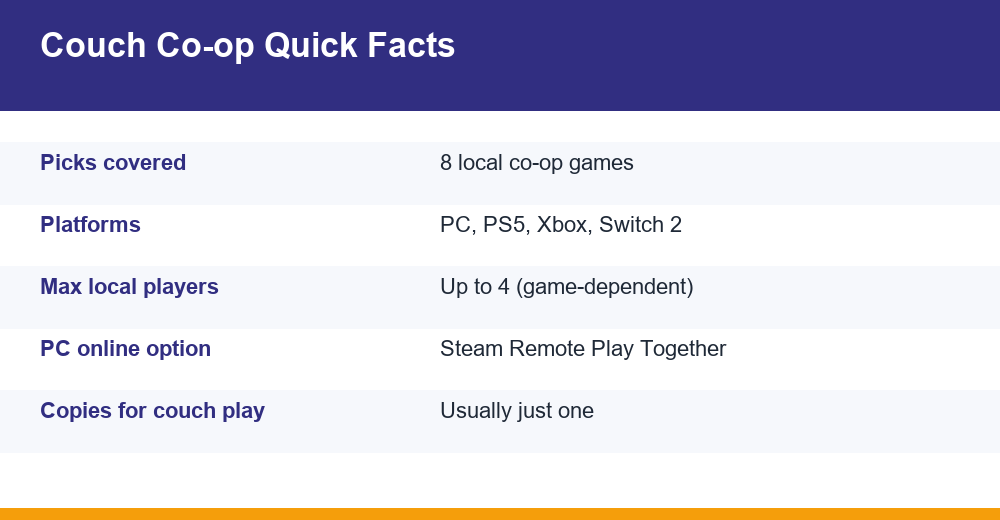
    Good split screen co op games have become harder to find, because so many studios now ship online-only co-op and call it a day. This list sticks to games where two or more people can play on one screen, from one copy, on the same sofa. For every pick we flag the platform catches, especially on PC, where local play often needs extra controllers or Steam Remote Play Together.

    split screen co op games — infographic

    What counts as true split-screen co-op

    Marketing pages use “co-op” loosely. A game can advertise four-player co-op and still require four consoles, four copies and four internet connections. For this list, a game only qualifies if at least two players can share one screen and one system.

    There are two flavours of local play worth separating:

    • Split-screen: the display is divided so each player has their own camera. This is what you need for shooters, racers and big 3D worlds.
    • Shared-screen: everyone stays inside one camera view, as in Overcooked or Cuphead. Great fun, but players can’t wander apart.

    We focus mainly on the first type and only mention shared-screen games where they are clearly the better option for a particular group. Diablo IV is the one exception in our main list, because its console couch mode gives both players full characters even though the camera is shared.

    We also call out console-only local play, which is the most common trap when shopping for split screen co op games: several big releases offer couch co-op on PS5 and Xbox but strip it from the PC version. A game that supports local co-op on one platform does not automatically support it everywhere.

    The 8 best split screen co op games for 2026

    These picks cover story adventures, looters, racers and sandbox games, so there is something for a date night, a family weekend or a session with old friends. If you also want online picks, our wider roundup of the best co-op games of 2026 covers both.

    1. Split Fiction

    Hazelight’s March 2025 follow-up to It Takes Two is the strongest two-player campaign available right now. Two writers trapped in their own stories swap between sci-fi and fantasy worlds, and almost every chapter introduces a new mechanic. It is strictly two-player: there is no solo mode.

    It launched on PC, PS5 and Xbox Series X|S, then arrived on Switch 2 in June 2025. Local play needs only one copy, and the Friend’s Pass lets a second player join online for free if you can’t share a sofa. Expect roughly a dozen or more hours for the main story, depending on how often you stop for side stories.

    2. It Takes Two

    The game that put Hazelight on the map is still a superb couch pick, and it is usually cheaper than Split Fiction. A bickering couple, shrunk into dolls, must work together through a series of inventive levels. It plays well with one experienced player and one newcomer, which is rare for a 3D platformer.

    It has native PS5 and Xbox Series X|S versions as well as PC, and a Switch version that also runs on Switch 2 through backward compatibility. A Friend’s Pass is available here too.

    3. Mario Kart World

    The Switch 2 launch title supports classic four-way split-screen on one console. The open world connecting the tracks gives it more variety than earlier entries, and assist options such as smart steering keep younger players in the race. It is the easiest recommendation for mixed-skill families, but it is exclusive to Nintendo’s hardware.

    4. Borderlands 4

    Gearbox kept two-player split-screen for its September 2025 looter shooter, but only on consoles. On PS5 and Xbox Series X|S two people can play the full campaign on one screen, each with their own Vault Hunter and loot. PC players need online co-op instead. More on that below.

    5. Minecraft

    The console Bedrock editions support split-screen for up to four players, which makes Minecraft the default sandbox for families. The PC editions do not offer native split-screen, so desktop players need separate accounts and machines. If building and gathering is your thing, see our list of best survival crafting games for more options.

    6. Stardew Valley

    Since update 1.5, Stardew supports local split-screen farming for up to four players, including on PC. It is relaxed, forgiving and endlessly replayable, and it remains one of the few indie hits that treats local co-op as a first-class feature across platforms.

    7. Diablo IV

    Blizzard’s action RPG supports two-player couch co-op on PS5 and Xbox. The camera stays shared rather than split, but both players get full characters, loot and progression. Like Borderlands 4, the PC version leaves couch co-op out, and there is no Switch release.

    8. Rocket League

    Free to play and still brilliant, Rocket League offers split-screen for up to four players on consoles and on PC. Matches last about five minutes, so it is ideal when you only have a short window or a big group passing controllers around. Note that each extra local player usually needs to be signed in to play online modes; offline exhibition matches avoid that.

    Platform and player-count comparison

    Use this table to check whether a game will actually work on the hardware you own before you buy it. Local player counts refer to one system and one screen.

    GameLocal playersPC split-screenPS5 / XboxSwitch 2
    Split Fiction2YesYesYes
    It Takes Two2YesYesVia Switch 1 version
    Mario Kart WorldUp to 4No (exclusive)NoYes
    Borderlands 42NoYesDelayed
    MinecraftUp to 4NoYesYes
    Stardew ValleyUp to 4YesYesYes
    Diablo IV2 (shared camera)NoYesNo
    Rocket LeagueUp to 4YesYesVia Switch 1 version

    Two patterns stand out. Hazelight games and indie titles tend to support local play everywhere, while big-budget releases are more likely to treat split-screen as a console-only feature. When you browse new split screen co op games, check the store page’s feature list and look for wording such as “shared/split screen” rather than plain “co-op”.

    What are the best split-screen games on PS5?

    PS5 owners get one of the widest choices, because Sony’s console receives almost every multiplatform game with couch co-op intact. Our top PS5 picks:

    1. Split Fiction for the best two-player story.
    2. Borderlands 4 for loot-driven shooting on one screen.
    3. Diablo IV for a long-term RPG you can grind together.
    4. Minecraft for up to four builders at once.
    5. Rocket League for quick, competitive or co-op matches.

    It Takes Two is also playable natively on PS5, and Baldur’s Gate 3 deserves a mention: Larian’s RPG supports two-player split-screen on PS5, which makes a campaign that can run past 100 hours far more sociable. Just be ready for a long commitment.

    One practical note: the DualSense controller is sold separately, so budget for a second pad if your console came with only one. Each local player can also sign in to their own PSN profile so progress and trophies go to the right person.

    Split screen co op games on Xbox and Switch 2

    Xbox Series X|S owners get nearly the same line-up as PS5: Split Fiction, It Takes Two, Borderlands 4, Diablo IV, Minecraft, Stardew Valley and Rocket League all support local play. Xbox also makes it easy to sign in extra profiles on one console, which keeps saves and achievements separate.

    A few platform points worth knowing:

    • Xbox Series S owners should check each game individually. Baldur’s Gate 3, for example, offers split-screen on Series X but not on Series S.
    • Game Pass rotates its catalogue, so a couch game that is included today may leave later. Check before planning a long campaign around it.
    • Switch 2 plays most Switch 1 games through backward compatibility, so older local co-op favourites such as It Takes Two and Rocket League still work.

    Switch 2 is the strongest console for family couch play, thanks to Mario Kart World and detachable Joy-Con 2 controllers that give you a second pad out of the box for many two-player games. Its weak spot is big third-party releases: the Switch 2 version of Borderlands 4 was indefinitely delayed in 2025, so check the Nintendo eShop listing for its current status before you plan around it.

    What PC games have split-screen co-op?

    PC is where couch co-op is most patchy. Many developers assume PC players will connect online, so local support depends heavily on the studio. From our list, these work natively on one PC:

    • Split Fiction and It Takes Two, with two controllers or a controller plus keyboard and mouse.
    • Stardew Valley, up to four players with controllers.
    • Rocket League, up to four players with controllers.

    Beyond our main list, plenty of indie split screen co op games run well on PC too, though shared-screen titles such as Overcooked! 2 and Cuphead are more common than true split-screen ones.

    Does Borderlands 4 have split-screen?

    Yes, but only on PS5 and Xbox Series X|S, where two players can share one screen for the whole campaign. The PC version does not support split-screen, so PC players must use online co-op. The Switch 2 version has been delayed, so check the official store page before buying for couch play.

    The same console-only split applies to Diablo IV and to Minecraft’s Bedrock console editions. If local play on PC matters to you, confirm it on the Steam page under the “Shared/Split Screen” feature tags before you pay.

    How do you play split-screen on PC?

    If a game supports local co-op on PC, setup is usually quick. Here is the process that works for most titles:

    1. Connect a controller for each extra player. Xbox and PlayStation pads work over USB or Bluetooth.
    2. In Steam, open Settings, then Controller, and make sure Steam Input is enabled for the controller brands you use.
    3. Launch the game, open its local or couch co-op menu, and press a button on each controller to join.
    4. If the game supports it, let one player use keyboard and mouse to save buying another pad.

    If a second controller isn’t detected, try turning Steam Input off for that game in its Properties menu, since some titles read pads directly. A wired connection is also the quickest way to rule out Bluetooth pairing issues.

    Using Steam Remote Play Together

    Remote Play Together lets you stream a local multiplayer game over the internet. Only the host needs to own the game; friends join through a Steam invite and send their controller inputs to your PC. It only works with games that already support local multiplayer, so it won’t add split-screen to a title that lacks it.

    Latency depends on your upload speed and your friends’ distance from you, so it works best for turn-based or slower games. For fast shooters, native online co-op is usually smoother.

    Avoid unofficial split-screen mods and injectors unless you understand the risks. They can break with updates, and in online games they may conflict with anti-cheat systems.

    What are the best couch co-op games for couples?

    Couples often want something different from a group of friends: a shared story, less pressure and difficulty that suits two different skill levels. These are the picks we recommend most:

    • It Takes Two: literally about a couple, with puzzles that force constant communication.
    • Split Fiction: bigger and more spectacular, ideal once you’ve finished It Takes Two.
    • Stardew Valley: cosy and low-stress, perfect for short evening sessions.
    • Mario Kart World: light competition with plenty of assist options.
    • Overcooked! 2: shared-screen rather than split, but a great test of teamwork.

    If one partner rarely plays, start with Stardew Valley or Mario Kart World, then move on to the Hazelight games once you’re both comfortable with a controller.

    If one of you prefers huge online RPGs, note that popular gacha games are online-only for co-op. Our comparison of Genshin Impact vs Honkai: Star Rail explains how co-op works in each, and why neither fits a single-screen setup.

    Setup tips for a better couch session

    Small details make a big difference when two or more people share one display. A little preparation keeps a session from turning into an argument over the remote.

    • Screen size: four-way split-screen on a small TV is hard to read. Two players works on most sets; four is best on a large screen.
    • Charge controllers before guests arrive, or keep a USB cable nearby.
    • Turn on game mode on your TV to cut input lag.
    • Check text size: many games let you scale subtitles and HUD elements, which helps in split-screen.
    • Pick the right length: Rocket League suits a quick hour, while Split Fiction is better across several evenings.

    Seating matters more than people expect. Players should sit roughly centred in front of the screen, since viewing a split image from a sharp angle makes the far half harder to read.

    Finally, before you buy anything for local play, read the official feature list carefully. The best split screen co op games are clear about player counts and platforms, and anything vague on that front usually means online only.

    Frequently Asked Questions

    What are the best split screen games on PS5?

    Split Fiction is the best two-player story on PS5, and Borderlands 4 is the top pick for couch shooting and looting. Diablo IV suits players who want a long RPG together. Minecraft and Rocket League handle up to four local players. Baldur’s Gate 3 also supports two-player split-screen on PS5 if you want a lengthy campaign.

    What PC games have split screen co-op?

    On PC, Split Fiction, It Takes Two, Stardew Valley and Rocket League all support local play on one machine. Several big releases, including Borderlands 4 and Diablo IV, offer couch co-op only on consoles. Check the Steam store page for the Shared/Split Screen tag before buying any game for local play.

    How do you play split screen on PC?

    Connect a controller for each extra player, make sure Steam Input is enabled in Steam’s controller settings, then start the game’s local co-op mode and press a button on each pad to join. To play local-only games with friends elsewhere, Steam Remote Play Together streams the session online, and only the host needs to own the game.

    Does Borderlands 4 have split screen?

    Yes, Borderlands 4 supports two-player split-screen, but only on PS5 and Xbox Series X|S. The PC version does not include it, so PC players have to use online co-op instead. If couch play matters to you, buy the console version and check the official store listing for the current feature list.

  • Soulslike tips for beginners: 10 Essential Lessons for 2026

    Soulslike tips for beginners: 10 Essential Lessons for 2026

    These soulslike tips for beginners cover the habits that carry over from one game to the next, whatever you pick first. Series guides tell you where the best sword is hidden. This one covers why you keep dying and how to stop.

    soulslike tips for beginners — infographic

    Are Soulslike Games Too Hard for Casual Players?

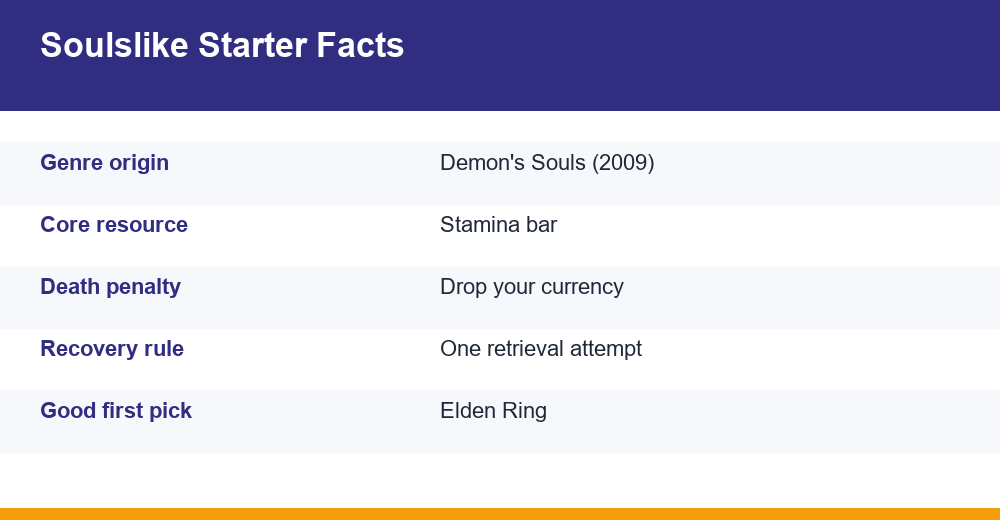
    The short answer is no, but they ask for a different kind of attention. In most action games, enemies wait their turn and button mashing works. A soulslike punishes greed. Any enemy can kill you, healing has a limit, and dying costs you something real.

    What casual players often miss is that the difficulty is readable. Enemies telegraph their attacks with wind-ups, sounds and stances. Once you start watching instead of reacting in a panic, fights that looked impossible break down into patterns you can learn.

    Modern entries are also much friendlier than their reputation. Open-world designs let you leave a boss and come back stronger, co-op summoning lets other players help you, and some games in the wider genre now include proper difficulty settings. If you can afford to die twenty times and enjoy figuring out why, you are not too casual for these games.

    What makes the genre feel hard at first

    • Limited healing: a fixed number of flask or potion charges per rest.
    • Respawning enemies: resting at a checkpoint brings most regular enemies back.
    • Currency on death: you drop your experience currency where you fall.
    • Commitment: once an attack animation starts, you usually cannot cancel it.

    None of these rules is there to be cruel. Limited healing makes every hit matter, respawning enemies let you farm a little currency when you need it, and committed animations mean your timing, not luck, decides the outcome.

    Which Soulslike Should You Play First?

    Your first game shapes whether the genre clicks. Most soulslike tips for beginners start with the same advice: pick one with an escape valve, meaning a way to go elsewhere, get stronger or call in help when a wall appears. Linear games with a single path forward are the hardest place to start.

    Elden Ring is the most common recommendation, and with good reason. The open map means a stuck player can simply ride off, explore and return with more levels. Spirit Ash summons and online co-op add more ways through. Our ranking of the best soulslike games of 2026 covers the wider field once you have a first win under your belt.

    GameWhy it works for beginnersMain safety netStart here?
    Elden RingOpen world, explore around blockersSpirit Ashes, co-op, overlevelingYes
    Star Wars Jedi: Fallen Order / SurvivorFamiliar setting, readable combatSelectable difficulty modesYes
    Dark Souls RemasteredTeaches the classic rules cleanlyCo-op summons, multiple routesSecond game
    Hollow Knight2D, easier to read attacksExplore other areas, charmsYes, for 2D fans
    Sekiro: Shadows Die TwiceSuperb combat once learnedVery few; no co-opNot first

    Sekiro deserves a special note. It is brilliant, but it strips out most of the safety nets: no co-op summoning, no character builds in the usual sense, and its combat centres on deflecting. Save it until parry timing feels natural.

    The Star Wars Jedi games are worth a mention for anyone nervous about difficulty. They borrow the checkpoint rest, lost-experience rule and deliberate combat of the genre, but let you lower the challenge at any time. Beating one of them is a good confidence builder before a harder game.

    Soulslike Tips for Beginners: Stamina, Lock-On and Spacing

    If you take only one lesson from these soulslike tips for beginners, make it this: stamina is your real health bar. Attacking, dodging, blocking and sprinting all drain it. Run it dry and you cannot roll away from the next swing, which is how most early deaths happen.

    Manage stamina like a budget

    • Never empty the bar on offence. Keep enough for at least one dodge.
    • Attack in short strings of two or three hits, then back off.
    • Stop sprinting before you reach an enemy so you arrive with a full bar.
    • Lower your shield when you are not under attack; holding block slows stamina regeneration in many games.

    Use lock-on, but know when to drop it

    Locking on keeps the camera on one enemy and makes dodges and attacks travel toward it. It is essential for duels. Against groups, or bosses big enough to fill the screen, lock-on can trap the camera at odd angles. Learn to toggle it off and steer the camera yourself when you lose sight of things.

    Spacing beats speed

    Most attacks have a fixed reach. Standing just outside it, then stepping in after a swing whiffs, is safer than trying to out-trade an enemy. Watch the weapon, not the health bar. Pull single enemies toward you with a thrown item or a bow so you never fight three at once.

    Equipment weight matters too. In many of these games, carrying too much slows your dodge into a clumsy roll. Check your load indicator and drop heavy armour pieces if your roll looks sluggish.

    Should You Parry or Dodge?

    For a new player, the honest answer is to dodge first. Rolling has a generous window in most of these games, works against nearly every attack and only costs a little stamina. A parry is a high-risk, high-reward tool: miss the timing and you take the full hit with nowhere to go.

    The exception is games built around deflection. Sekiro centres its combat on blocking at the right moment to break the enemy’s posture, and some other recent soulslikes reward perfect guards heavily. In those games, practise parrying from the start, because dodging alone will not carry you.

    OptionRiskRewardBest used when
    Dodge rollLowSafe repositioningYou are learning a new enemy
    Shield blockLow to mediumStops damage, drains staminaUsing a good shield early on
    Parry or deflectHighOpening for a critical hitYou know the attack’s timing well
    Backstep or walk awayLowResets the fightOut of stamina or healing

    A practical approach: dodge through a boss on the first few attempts while you learn its moves. Once you know which attack is coming, try parrying only that one. Expanding your parry list one attack at a time is far less frustrating than trying to parry everything.

    Also learn which way to roll. Rolling toward and slightly past a sweeping attack often leaves you behind the enemy, ready to punish. Rolling straight back usually keeps you in range of the follow-up.

    How to Get Your Lost Currency Back

    The genre’s signature rule is simple and brutal. When you die, you drop all your unspent currency (souls, runes or the game’s equivalent) where you fell. Get back to that spot and touch the marker, and it is yours again. Die on the way, and the first pile is gone for good.

    Elden Ring softens this a little: your dropped runes usually appear at or near the spot where you died, and a consumable called the Sacrificial Twig keeps your runes on a death. Sekiro handles it differently, taking a share of your money and experience progress, with a random chance called Unseen Aid that the penalty does not apply. Know your game’s rule before you carry a big stack anywhere dangerous.

    A simple retrieval routine

    1. Spend currency before entering a boss fog or unknown area, even on a small upgrade.
    2. On the run back, skip enemies when you can. Fighting everything on the path wastes healing.
    3. Grab the marker first, then retreat to the checkpoint and bank or spend it.
    4. If the pile sits in a boss arena, decide honestly whether a quick grab is worth the risk.

    Above all, treat lost currency as a lesson, not a disaster. Early on, a few thousand runes or souls are easy to earn back in ten minutes. Staying calm keeps you from dying again in a rush to retrieve them.

    Forgiving Builds and the Easiest Elden Ring Start

    Builds matter less than you think in the first hours, but some choices make life much easier. Forgiving builds share three traits: they keep you away from danger, they hit hard without precise timing, and they leave room for mistakes.

    What is the easiest build for beginners in Elden Ring?

    Two common starts suit new players. The Astrologer begins with sorcery and lets you attack from range, which turns many close-quarters fights into target practice. The Vagabond or Samurai suit melee players: the Vagabond has sturdy armour and a shield, while the Samurai starts with a strong katana and a longbow.

    • Ranged magic: safe distance, simple stat focus on Intelligence.
    • Sword and board: a shield that blocks all physical damage forgives bad dodges.
    • Heavy armour: more poise means fewer staggers from weak hits.
    • Summons: Spirit Ashes pull boss attention away from you.

    Whatever you pick, put early levels into Vigor (or your game’s health stat). More health turns one-shot deaths into survivable mistakes, and it helps every build. Upgrading your main weapon also does more for damage than spreading points across many stats.

    If you came from online RPGs, a lot of this will feel familiar. The role choices in our MMORPG beginner tips carry over neatly: ranged casters trade defence for distance, tanks trade damage for survival, and the safest build is usually the one that fits how you like to play.

    How Do You Get Better at Soulslike Games?

    Improvement in this genre comes from deliberate attempts, not from repeating the same mistake faster. Each death should answer a question: which attack hit you, and what could you have done instead?

    Habits that speed up learning

    • Spend your first attempts on a boss just watching. Dodge and survive rather than attack.
    • Learn the one attack that keeps killing you, and ignore the rest for now.
    • Heal only when the boss has just finished a long combo or is far away.
    • Take breaks. Fatigue causes more deaths than any boss.

    Exploration is a skill too. Hidden items, shortcuts and stronger weapons are scattered off the main path. Opening a shortcut back to a checkpoint turns a five-minute run into a thirty-second one, which makes practising a hard section far less painful.

    Players who enjoy reaction-based combat in online games often adapt quickly. Fans of the titles in our guide to action combat MMORPGs already know how to read telegraphs and manage dodges, so lean on that instinct and add the patience soulslikes demand.

    Finally, use the community features. Messages left by other players warn of ambushes, bloodstains show how others died, and summoning a helper for a tough boss is a design choice the developers built in, not cheating.

    Common Beginner Mistakes and Quick Fixes

    Most early frustration traces back to the same few habits. The table below collects the mistakes that come up most often, together with simple fixes that need no extra skill.

    MistakeWhy it hurtsQuick fix
    Attacking until stamina is emptyNo energy left to dodgeTwo or three hits, then reset
    Healing in front of a bossGets punished mid-animationHeal after a combo or at range
    Carrying huge currency stacksOne death costs hoursSpend before risky areas
    Ignoring health upgradesBosses one-shot youLevel health early
    Fighting groups head-onAttacks from every sidePull enemies one at a time
    Rushing after a deathSecond death loses the pileWalk calmly, skip fights

    Run through this list whenever you hit a wall. Most of the time, the fix is a habit rather than a better weapon. That is the core idea behind these soulslike tips for beginners: the game rarely asks for perfect reflexes, only for patience and attention.

    Keep these soulslike tips for beginners in mind for your first twenty hours and the genre stops feeling like a punishment. It starts to feel like what it really is: a series of puzzles where you get a little better with every try.

    Frequently Asked Questions

    Which soulslike should I play first?

    Elden Ring is the safest first pick for most players. Its open world lets you leave a hard boss, explore, level up and return stronger, while Spirit Ash summons and online co-op give extra help. If you want selectable difficulty, Star Wars Jedi: Fallen Order or Survivor are gentler options. Leave Sekiro for later, because it has very few safety nets.

    Should I parry or dodge in soulslike games?

    Beginners should dodge first. Rolling has a generous timing window, works against almost every attack and costs little stamina. A missed parry leaves you wide open to the full hit. Add parries gradually, starting with one attack you know well. The exception is deflection-focused games like Sekiro, where parrying is the core mechanic and should be practised from the beginning.

    What is the easiest build for beginners in Elden Ring?

    Many new players find a ranged sorcery build from the Astrologer class easiest, since it keeps you out of melee range. For melee, the Vagabond’s armour and shield or the Samurai’s katana and longbow are both forgiving. Whichever you choose, level Vigor early, upgrade one main weapon and use Spirit Ash summons to split boss attention.

    Are soulslike games too hard for casual players?

    Not usually. The difficulty comes from patience rather than reflexes. Enemies telegraph attacks, patterns repeat and modern entries offer summons, co-op and open areas to explore around obstacles. Casual players who accept that dying is part of learning, take breaks and avoid greedy attacks tend to finish these games. Starting with a forgiving title makes a big difference.

  • Best City Builder Games 2026: 9 Essential Picks Worth Your Time

    Best City Builder Games 2026: 9 Essential Picks Worth Your Time

    Picking the best city builder games 2026 has on offer is less about ranking and more about matching a game to what you actually want from an evening. The genre has split: some of these are logistics simulations that will have you redesigning a junction at one in the morning, some are survival games wearing a city builder’s coat, and two of them have no fail state at all and exist purely to be pleasant. Buying the wrong one is how people conclude they do not like city builders. This list covers nine worth your time, what each one genuinely demands, and which to avoid if your machine is not new.

    best city builder games 2026 — infographic

    What changed in the genre

    For a long time the template was fixed: zone residential, commercial and industrial, lay roads, manage a budget, watch the population tick up. The modern genre has largely abandoned that as the only shape.

    Three directions opened up. Survival builders put a clock and a threat behind every decision, so the question stops being how large a city can grow and becomes whether it lasts the winter. Deep logistics builders removed the abstraction, making you model supply chains individually. And a smaller group stripped out failure entirely and kept only the placing of things.

    Those three want completely different amounts of attention, which is the single most useful thing to know before buying.

    Cities: Skylines II

    Still the default recommendation and still the one with the broadest reach. It does the traditional thing at a scale nothing else matches: zoning, road hierarchy, public transport, utilities and economy, across cities large enough that your early decisions become permanent constraints.

    Its real subject is traffic. Most players discover that a city which looked fine at forty thousand residents seizes up at ninety thousand, and the resulting redesign is either the best part of the game or the moment you stop playing. There is no middle reaction.

    The launch performance problems were real and have been substantially improved, but it remains demanding at scale, and a mid-range machine will slow noticeably on a large city. Start on a relaxed difficulty; the game teaches badly and punishes early mistakes that you cannot see for several hours.

    Frostpunk 2

    A city builder in structure and a game about governing under pressure in practice. You are managing a city in lethal cold, and the interesting decisions are political rather than spatial: which faction to placate, which law to pass, what you are prepared to do to keep people alive.

    The sequel widened the scale from a single settlement to whole districts, which some players felt lost the intimacy of the first game. It gained in return a genuine sense of governing something too large to see all of.

    Worth knowing before buying: it is not relaxing, and it is not meant to be. If the appeal of the genre for you is a calm evening arranging streets, this is the wrong one on this list by some distance.

    Against the Storm

    The most interesting structural idea in the genre right now, and the one most often missed because it does not look like a city builder in screenshots.

    You build settlements that are deliberately temporary. A run lasts under an hour, the rain eventually ends it, and progress carries into the next one through permanent upgrades. It is a roguelite built out of city building, and it solves the genre’s oldest problem, which is that most city builders become boring once the city is established and nothing is at stake.

    It also suits people who do not have three-hour blocks to give. A settlement fits into a lunch break, which on this list is rare.

    Workers & Resources: Soviet Republic

    The deep end, and honest about it. You are not zoning anything. You are building a planned economy from raw materials up, and every resource physically exists and has to be moved by a vehicle you bought, on a road you built, driven by a worker who had to get there.

    Want a brick factory? Then you need clay, a quarry, trucks, a route, somewhere for the workers to live, a bus to bring them, and a shop for them to spend wages in. Miss one link and the whole chain stops, and the game will not tell you which link it was.

    • Expect to lose your first several republics outright
    • The tutorial is adequate rather than good; the community guides are better
    • Runs on modest hardware, unlike most of this list
    • Enormously rewarding if the failure is the interesting part for you

    Manor Lords and Timberborn

    Two very different games that share a quality: both are built around one idea executed unusually well.

    Manor Lords is a medieval settlement builder with organic road growth and a genuine attention to how a mediaeval village actually functioned. Its building and landscape work is among the prettiest in the genre. It remains in development, and the combat and late game are thinner than the early hours, so buy it for the settlement building rather than the battles.

    Timberborn is about beavers, water and vertical space, which sounds like a novelty and is not. Damming rivers, storing water against a drought cycle and building upward rather than outward produces a puzzle no other builder offers, and the drought mechanic supplies the stakes that many peaceful builders lack.

    Townscaper, Dorfromantik and the quiet end

    Neither of these is a simulation and both belong on any serious list, because what a lot of people want from the genre is the placing of things rather than the managing of them.

    Townscaper has no goal, no economy and no failure. You click, and an algorithm turns your clicks into a plausible and rather beautiful coastal town. It costs very little, runs on anything, and is the closest the medium comes to a fidget toy.

    Dorfromantik adds the lightest possible scoring to hexagonal tile placement and is quietly one of the most relaxing games of the last few years. Both work in ten-minute sessions, which almost nothing else here does.

    Banished, and why it survives

    More than a decade old, made largely by one person, and still recommended without embarrassment. Banished is a small-scale medieval survival builder where the entire difficulty is food, firewood and the fact that your population will age and die.

    Its lasting lesson is that constraint beats scale. There is no combat, no technology tree worth the name, and a handful of building types, and it remains tense throughout because the margin for error is genuinely thin. Many larger games on this list would be improved by its restraint.

    It also runs on practically anything, which matters more than it should. A great deal of the genre now assumes recent hardware, and if that is a constraint for you, our round-up of games that run well on low-spec machines covers more in the same situation.

    Mods, DLC and the real cost

    Two things distort the price of a city builder, and both are easy to miss at the checkout.

    The first is downloadable content. Paradox-published builders in particular follow a long-tail model where the base game is the beginning of the spend, and a complete collection several years in can cost three or four times the original price. None of it is required, and the base games stand up on their own, but a sale price on the base game is not the price of the full experience being discussed in forums.

    The second is mods, which cut the other way. On Cities: Skylines in particular the modding community has produced tools that most players consider essential, including better road editing, traffic control and an undo function the base game lacks. They are free, and they change the game substantially.

    • Check whether the version you are buying supports mods before you commit
    • On a modded setup, add mods a few at a time so you can tell which one broke a save
    • Expect mods to break after major patches, sometimes for weeks
    • Workers & Resources and Timberborn both have active and well-organised mod scenes

    Worth saying plainly: a heavily modded city builder is a different game from the one that was reviewed, usually a better one, and occasionally an unstable one. If you want something that works the day you buy it with no maintenance, the self-contained titles on this list suit better.

    There is also a hardware cost that sits outside the price tag. Save files in large-scale builders grow steadily, simulation slows as cities expand, and the smoothness that made the first hour pleasant can be gone by hour forty. That is not a bug so much as the genre’s nature, and it is the reason the smaller-scale games here often get played for longer.

    Choosing between the best city builder games 2026

    Work backwards from how you want to feel rather than from feature lists, because the best city builder games 2026 offers are separated far more by tone than by mechanics.

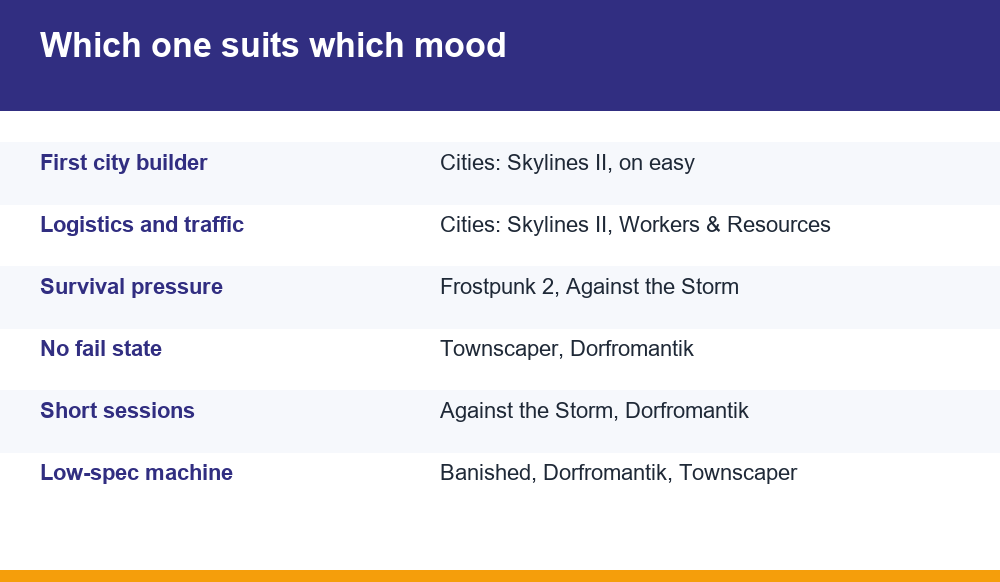
    If you wantStart with
    A big city to manage and perfectCities: Skylines II
    Hard decisions with consequencesFrostpunk 2
    Something finishable in an hourAgainst the Storm
    Total depth and no hand-holdingWorkers & Resources
    Beauty and historical textureManor Lords
    A puzzle with a clear hookTimberborn
    To switch off entirelyTownscaper or Dorfromantik

    One practical warning that applies across the genre: almost all of these have a difficulty curve concentrated in the first two hours, and most teach themselves poorly. If a builder feels impenetrable early, that is usually the tutorial failing rather than the game being beyond you, and a single community guide tends to fix it.

    A note on where to buy and when. City builders discount deeply and often, and several here have been reduced by seventy per cent or more in seasonal sales. Unless you want it this week, the genre rewards waiting, and the exception is a game still in active development, where buying early supports the work and the price typically rises as it approaches release rather than falling.

    If you are buying only one and want the lowest chance of regret, Against the Storm is the safest recommendation on this page. It is inexpensive, it runs on almost anything, a session fits an hour, and it is the rare builder that keeps a reason to play after the settlement is working. Cities: Skylines II is the better game if you specifically want a large city to perfect, but it asks considerably more of both your machine and your evening.

    Frequently Asked Questions

    Which is the best city builder for a complete beginner?

    Cities: Skylines II on a relaxed difficulty, because it is the most conventional and the most documented, so help is easy to find. If that feels like too much management, Dorfromantik or Townscaper give you the placing without the simulation.

    Do I need a powerful PC for city builders?

    For Cities: Skylines II at a large population, yes. Several of the best options run comfortably on modest hardware, including Banished, Timberborn, Dorfromantik and Townscaper, and Workers & Resources is far lighter than its depth suggests.

    What is the difference between a city builder and a colony sim?

    Mostly scale and focus. City builders manage systems and districts at a distance, while colony sims follow individual inhabitants and their needs. Games like Against the Storm and Banished sit between the two, which is part of their appeal.

    Are there good city builders without failure states?

    Townscaper has no goals or losing at all, and Dorfromantik only scores you rather than ending the run badly. Most other builders can also be set to a relaxed or sandbox difficulty, which removes most of the pressure without removing the systems.

    Is Manor Lords finished?

    No, it remains in active development. The settlement building is strong and worth the money on its own, but the combat and the late game are noticeably thinner than the early hours, so buy it for the village rather than the battles.

  • Best low spec games: 10 Great Picks for Weak PCs in 2026

    Best low spec games: 10 Great Picks for Weak PCs in 2026

    The best low spec games in 2026 are not just ancient titles found by sorting a store by release date. They are well-made games that still play smoothly on an office laptop with integrated graphics and a modest amount of memory. This guide sets out what “low spec” actually means, then gives ten picks with sensible settings, rough frame-rate expectations and the tweaks that matter most.

    best low spec games — infographic

    What Counts as Low Spec in 2026

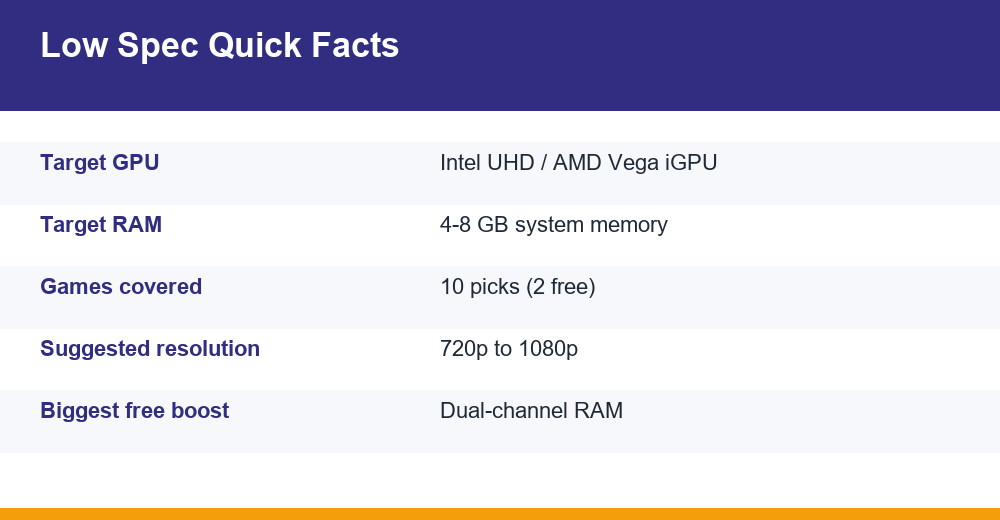
    “Low spec” gets thrown around loosely, so here is the definition this guide uses. A low-spec PC has integrated graphics, not a dedicated graphics card, and somewhere between 4 GB and 8 GB of system RAM. That covers most budget laptops, school-issued machines and small office desktops sold over the last several years.

    In practice that means one of these two families of graphics:

    • Intel UHD Graphics (UHD 600, 620, 630 and similar), found in many Core i3, i5 and i7 laptops and desktops from the late 2010s onward.
    • AMD Radeon Vega integrated graphics (Vega 3, 6, 8 and 11), built into Ryzen and Athlon APUs from the same era.

    Newer integrated chips such as Intel Iris Xe and AMD’s RDNA-based Radeon graphics are noticeably faster. If you have one, every game below will run more comfortably and you can raise settings. The Steam Deck also uses an AMD APU, which is why handheld-friendly games and low-spec games overlap so much.

    The other half of the equation is memory. Integrated graphics borrow part of your system RAM as video memory, so a machine with 4 GB has less room for both the game and Windows. That one detail explains much of why some games stutter on hardware that looks adequate on paper.

    The 10 Best Low Spec Games for a Weak PC

    So what are the best games for a low-end PC in 2026? These picks were chosen for quality first and hardware demand second. Each one is a game people still talk about and play, not filler added to reach a number. Several are indies with stylized 2D art, which ages well and puts little load on a weak GPU.

    Taken together, these are the best low spec games we would recommend to anyone stuck on integrated graphics, covering farming, action, platforming, card games and competitive multiplayer.

    1. Stardew Valley

    The farming-and-friendship sim is about as light as modern games get. Its pixel art barely registers on integrated graphics, and it runs well even on machines that struggle with heavy web pages. Free updates and co-op support give it real longevity, and it is one of the safest purchases for any older laptop.

    2. Hades

    Supergiant’s action roguelike looks hand-painted but is well optimized. On Intel UHD or Vega graphics it is playable at 720p or 1080p with modest settings, and the combat stays readable. If you enjoy its loop of runs and upgrades, our roundup of the best roguelike games has more in the same vein, many of them equally light.

    3. Hollow Knight

    A huge, atmospheric metroidvania with tight controls and a striking 2D style. It is very forgiving on weak hardware and is one of the best value-for-money games on PC. The original game is lighter than its 2025 sequel, Silksong, so start here on older machines.

    4. Terraria

    Digging, building, boss fights and co-op, all in 2D. Terraria’s game logic runs at a fixed 60 updates per second, and the visuals are simple enough that most integrated GPUs keep up. Very large builds and busy multiplayer worlds load the CPU more than the graphics.

    5. Slay the Spire

    The deckbuilding roguelike that launched a genre. It is turn-based, so frame rate barely matters, and it runs on almost any Windows laptop. It is ideal for short sessions on a machine with only 4 GB of RAM.

    6. Vampire Survivors

    Simple to learn and dangerously moreish. The early minutes of a run are trivially light. Late in a run, hundreds of enemies and effects can push a weak CPU, so lower the visual effects in the options if you notice slowdown.

    7. Balatro

    A poker-themed roguelike deckbuilder that became a surprise hit in 2024. Its card-table presentation is light, play is turn-based, and it works on low-end laptops and handhelds alike. The screen-shake and CRT effects can be turned down in the settings.

    8. Celeste

    A precision platformer with a heartfelt story and an excellent soundtrack. It needs a stable frame rate for its tight jumps, and integrated graphics deliver that comfortably. A controller helps, but keyboard play works fine.

    9. Dota 2

    Valve’s free MOBA scales down well. With most effects off and resolution lowered, it is playable on many integrated GPUs, although large team fights demand more than laning does. Expect to spend some time in the video settings to find a stable balance.

    10. League of Legends

    Riot’s long-running MOBA has always targeted modest PCs, and it remains one of the easiest competitive games to run on integrated graphics. It is free to play, with optional cosmetic purchases.

    Suggested Settings and Approximate Frame Rates

    The table below gives a starting point for each game on a typical machine with Intel UHD 620 or AMD Vega 8 graphics and 8 GB of dual-channel RAM. The frame rates are approximate expectations based on how demanding each game is, not lab results. Your numbers will vary with CPU, drivers, cooling and memory setup.

    GamePrice modelSuggested setupApprox. FPS (UHD 620 / Vega 8)4 GB RAM friendly?
    Stardew ValleyPaid1080p, defaultAbout 60Yes
    HadesPaid720p-1080p, low/mediumAbout 40-60Usable, tight
    Hollow KnightPaid1080p, defaultAbout 50-60Yes
    TerrariaPaid1080p, lighting reducedAbout 50-60Yes
    Slay the SpirePaid1080p, defaultAbout 60Yes
    Vampire SurvivorsPaid1080p, effects reducedAbout 30-60 (late runs dip)Yes
    BalatroPaid1080p, CRT/shake reducedAbout 60Yes
    CelestePaid1080p, defaultAbout 60Yes
    Dota 2Free720p, low, effects offAbout 30-60Tight
    League of LegendsFree1080p low or 720p mediumAbout 50-60+Usable, tight

    “Tight” means the game will start and run, but with a browser, chat app and Windows background tasks open you may see stutter. Close everything else before playing on a 4 GB machine.

    On AMD Vega systems, performance depends heavily on memory speed and channel count. Two matched sticks of RAM can make a bigger difference than any in-game setting, which is why even the best low spec games can feel sluggish on a single-stick laptop.

    Free Games That Run on Low-End Hardware

    If your budget matches your hardware, there is plenty to play for nothing. Two of the ten picks above, Dota 2 and League of Legends, are already free. A few other long-running free options also suit integrated graphics:

    • Team Fortress 2: Valve’s class-based shooter dates from 2007 and runs on very modest graphics at low settings.
    • Dota 2 and League of Legends: the two biggest MOBAs, both tunable down to low-end laptops.
    • Free demos: Steam Next Fest and regular store demos let you test a game on your own hardware before buying, which is the most reliable compatibility check there is.

    Free-to-play shooters built on newer engines are a mixed bag. Some offer a performance mode for weaker hardware, while others assume a dedicated GPU. Our list of the best free-to-play games of 2026 covers each in more detail; check a game’s minimum requirements against your hardware before downloading tens of gigabytes.

    A useful habit: look at the minimum graphics line on a store page, not just the RAM figure. If it names a dedicated card from the last few years, an integrated GPU will probably fall short.

    What Games Can You Play Without a Graphics Card?

    Strictly speaking, every PC has graphics hardware. What people usually mean is a computer with no separate graphics card. On those machines you can comfortably play 2D indies, turn-based strategy, card games, older 3D titles and most MOBAs. Everything in the top ten falls into one of those groups.

    The games to avoid are recent big-budget 3D releases built around a dedicated GPU, particularly open-world games and those that require ray tracing. Many of them will not reach a playable frame rate on integrated graphics even at the lowest settings.

    Can Integrated Graphics Run Modern Games?

    Some, yes. Older chips like Intel UHD 620 and Vega 8 can run modern indies and well-optimized competitive games, but not most new AAA releases. Newer integrated graphics are a different story: recent AMD APUs, like the one in the Steam Deck, can handle many current games at reduced resolution and settings.

    A good rule of thumb is that anything rated Steam Deck Verified has been checked to run acceptably on an AMD APU. That is not a guarantee for older laptop chips, but it is a strong hint. Our guide to the best Steam Deck games is a useful shortlist of titles that run well on modest, power-limited hardware.

    What Games Run on 4GB RAM?

    With 4 GB of RAM, stick to light 2D and turn-based games: Stardew Valley, Terraria, Slay the Spire, Celeste, Hollow Knight, Balatro and Vampire Survivors are all good bets. Remember that integrated graphics take part of that memory, so Windows and the game share less than 4 GB in practice.

    If you can upgrade, going from 4 GB to 8 GB (ideally as two matched sticks) is the single most effective improvement for an older laptop, both in games and in everyday use. Check first whether your laptop’s memory is soldered, since many thin models cannot be upgraded.

    How to Improve FPS on a Low-End PC

    Before blaming the hardware, work through these steps in order. The first few cost nothing and often deliver the biggest gains.

    1. Plug in the charger. Many laptops throttle the CPU and GPU heavily on battery.
    2. Set Windows to its best-performance power mode while gaming, and leave Game Mode switched on.
    3. Update graphics drivers directly from Intel or AMD; laptop makers’ bundled drivers are often years old.
    4. Close background apps, especially browsers, launchers and chat apps, which eat RAM that integrated graphics need.
    5. Lower the resolution before anything else. Dropping from 1080p to 720p cuts the pixel count by more than half and helps integrated GPUs more than any single quality setting.
    6. Turn off shadows, anti-aliasing and post-processing, usually the heaviest settings in a game.
    7. Cap the frame rate to a steady 30 or 60 so the laptop does not overheat and throttle.
    8. Check dual-channel memory. A single RAM stick halves the memory bandwidth that integrated graphics depend on.

    Cooling matters too. Integrated chips share a cooler with the CPU, and a laptop with dusty vents will slow itself down within minutes. Raising the rear of the laptop and cleaning the vents can restore lost performance.

    Finally, turn on an FPS counter (Steam has one in its in-game overlay settings) so you can see whether each change actually helps instead of guessing.

    How to Choose the Best Low Spec Games for Your Machine

    Lists are a starting point, but your exact machine decides what works. When you are weighing up the best low spec games for your own setup, these checks will save money and frustration:

    • Know your hardware. In Windows, Task Manager’s Performance tab shows your GPU name and how much RAM you have.
    • Compare against the minimum line on the official store page, focusing on the graphics requirement.
    • Favour 2D, turn-based and stylized games, which hold up best on integrated graphics.
    • Use refund windows sensibly. Steam accepts refund requests for games played under two hours within 14 days of purchase, which leaves time to test performance.
    • Try demos and free weekends whenever they appear.

    The good news is that a weak PC no longer means a weak library. Many of the most acclaimed games of the past decade, from Hades to Balatro, run happily on hardware that cannot touch the latest blockbusters. Start with the best low spec games above, tune the settings, and you will have far more to play than time to play it.

    Frequently Asked Questions

    What games can I play without a graphics card?

    On a PC with only integrated graphics you can comfortably play 2D indies, turn-based and card games, older 3D titles and most MOBAs. Good examples are Stardew Valley, Hades, Hollow Knight, Terraria, Slay the Spire, Balatro, Dota 2 and League of Legends. Recent open-world AAA games built for dedicated GPUs are generally out of reach.

    Can integrated graphics run modern games?

    Older chips like Intel UHD 620 and AMD Vega 8 handle modern indies and well-optimized competitive games, but not most new AAA releases. Newer integrated graphics, like the AMD APU in the Steam Deck, are far more capable and run many current games at lower resolution and settings.

    What games run on 4GB RAM?

    Light 2D and turn-based games are the safest choice with 4 GB of RAM, for example Stardew Valley, Terraria, Slay the Spire, Celeste, Hollow Knight, Balatro and Vampire Survivors. Integrated graphics use part of that memory, so close browsers and other apps before playing to avoid stutter.

    How do I improve FPS on a low end PC?

    Plug in your laptop, use a high-performance power mode and update graphics drivers from Intel or AMD. Close background apps, drop the resolution to 720p, and turn off shadows and anti-aliasing. Making sure your RAM runs in dual-channel mode can also give integrated graphics a large boost.

  • Is Game Pass worth it in 2026? An Honest 7-Point Verdict

    Is Game Pass worth it in 2026? An Honest 7-Point Verdict

    Is Game Pass worth it after a price hike and a price cut in the space of a year? We break down every 2026 tier, from Essential to Ultimate, with the real cost per game for different kinds of players. You will also see how it stacks up against PlayStation Plus.

    is game pass worth it — infographic

    Game Pass tiers and prices in late 2026

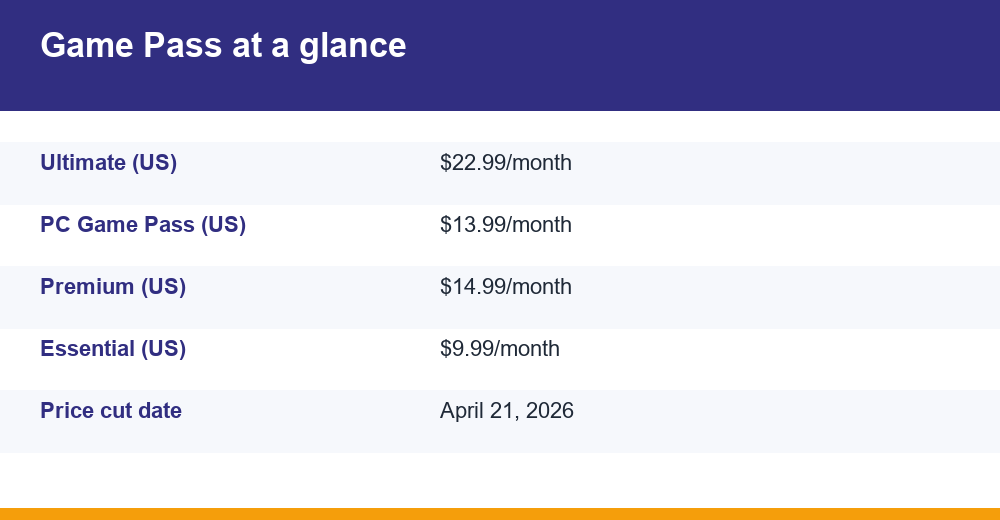
    Xbox Game Pass has changed shape twice in twelve months. In October 2025 Microsoft replaced the old Core and Standard plans with Essential and Premium, and raised Ultimate to $29.99 a month. Then, on April 21, 2026, Xbox Wire announced a cut: Ultimate fell to $22.99 and PC Game Pass to $13.99.

    Here is how the four plans compare today, using US monthly prices. Essential and Premium are shown at the prices they launched with in October 2025. Xbox has not announced a change to either since. Prices vary by region, so check your local store before you subscribe.

    PlanUS price / monthLibrary (per xbox.com)Day-one gamesCloud hours from Nov 2026
    Essential$9.9950+ gamesNo5 hours
    Premium$14.99200+ gamesNo (Xbox games within a year)10 hours
    Ultimate$22.99500+ gamesYes15 hours
    PC Game Pass$13.99300+ PC gamesYesNone

    Every console plan includes online console multiplayer, which is the main reason many people subscribe at all. Only Ultimate bundles EA Play, Fortnite Crew and Ubisoft+ Classics. PC Game Pass includes EA Play but no cloud streaming.

    So is Game Pass worth it at these prices? The answer changes a lot by tier, so the sections below look at each plan separately instead of treating the service as one product.

    The November 2026 cloud change

    In a September 3, 2026 post, Xbox said monthly cloud playtime caps arrive in November: 15 hours on Ultimate, 10 on Premium and 5 on Essential. Extra hours will be sold separately. Xbox estimates the change affects about 4% of subscribers, but if you stream on a phone or TV every night, factor it in.

    How much is Game Pass Ultimate in 2026?

    In the US, Game Pass Ultimate costs $22.99 a month as of late 2026. Xbox set that price on April 21, 2026, down from the $29.99 it had charged since October 2025. Over a full year that comes to about $276, compared with roughly $360 before the cut.

    The cut came with a trade-off. In the same announcement, Xbox said future Call of Duty games will no longer launch on Ultimate or PC Game Pass. Instead they arrive the following holiday season, about a year after release. Call of Duty games already in the library stay there.

    • What $22.99 still buys: 500+ games, day-one releases, EA Play, Fortnite Crew, Ubisoft+ Classics and online multiplayer
    • What changed: new Call of Duty games now arrive about a year after launch
    • What is coming: a 15-hour monthly cloud cap from November 2026

    If you only signed up for Call of Duty, the cut doesn’t help you much. You would do better buying the game and pairing it with Essential for online play.

    Is Game Pass Premium or Ultimate better value?

    The gap between the two is now $8 a month, or about $96 a year. For that money, Ultimate adds day-one access to new releases, a library more than twice the size, EA Play, Ubisoft+ Classics, Fortnite Crew and 5 more cloud hours a month.

    Premium’s catch is timing. Xbox says new Xbox-published games join Premium within a year of launch, so you still get the big first-party games, just later. Third-party day-one launches stay with Ultimate and PC Game Pass.

    Pick Premium if you

    • Play mostly older games and don’t mind waiting for new ones
    • Want online multiplayer plus a large back catalogue for $14.99
    • Already own the new releases you care about

    Pick Ultimate if you

    • Want to play new Xbox and partner games on launch day
    • Would use EA Play titles such as EA Sports games, or Ubisoft+ Classics
    • Play on both console and PC, since Ultimate covers both

    A simple test: if you would buy one or two new full-price games a year that launch on Game Pass, Ultimate’s extra $96 is roughly covered by what you save.

    Is PC Game Pass worth it?

    For many PC players, yes. At $13.99 a month since April 2026, PC Game Pass is the cheapest way to get day-one Xbox releases on Windows. It also includes EA Play, which covers a large slice of EA’s back catalogue.

    What you don’t get: cloud streaming, the console library and Ultimate’s extra partner perks. You also play through the Xbox app, so games are not added to your Steam library. A game you own on Steam and also play through Game Pass may keep separate saves, so check cross-save support before switching.

    • Good fit: a PC-only player who tries several new releases a year
    • Weak fit: someone who mostly buys discounted games in Steam sales and plays them for hundreds of hours
    • Tip: subscribe for a month when a big first-party game launches, then cancel

    That last tactic is perfectly normal. Monthly plans renew until cancelled, and you can turn off recurring billing in your Microsoft account whenever you like.

    Ask yourself one question before you sign up: is Game Pass worth it on PC compared with the games you would buy in a Steam sale anyway? If you would play two or more new releases a year, it usually is.

    Does Game Pass still get day-one games?

    Yes, on Ultimate and PC Game Pass. Xbox’s own studios keep launching games straight into the service, and Xbox Wire’s 2026 Game Pass roundups featured big first-party arrivals such as Forza Horizon 6, Halo: Campaign Evolved and Gears of War: E-Day. Partner games also arrive on launch day, though the mix changes month to month.

    The big exception is Call of Duty. Black Ops 7 launched on Game Pass in 2025, but from 2026 new entries join about a year later. Essential and Premium do not get day-one releases at all, so read the plan wording carefully.

    Games also leave. Third-party titles rotate out, usually with notice, so a game you start today may not be there in six months. Owning a copy is still the only way to keep it.

    Is Game Pass worth it for your play style? The cost-per-game maths

    Whether the service is good value comes down to how many games you actually finish or spend real time with. Divide the yearly cost by the number of games you would otherwise have paid for, then compare that with typical shop prices.

    The table below uses US prices and an approximate $70 for a new release and $25 for an older game on sale. These are rough benchmarks, not official figures.

    Player typeBest planYearly costGames you’d buy anywayApprox. cost per game
    Casual: online play + a few old gamesEssential$119.882 older gamesAbout $60
    Backlog player, no rushPremium$179.885 older gamesAbout $36
    New-release fan, consoleUltimate$275.882 new + 4 olderAbout $46
    PC player, day-one fanPC Game Pass$167.882 new + 2 olderAbout $42
    One-game player (sports or shooter)Buy the gameAbout $701 new gameAbout $70

    Compare the last column with what those games would cost to buy. Two new games plus four older ones comes to roughly $240 at our benchmark prices, so Ultimate only just pays off at that level. Play more than that and the subscription pulls clearly ahead.

    The pattern is simple. If you would buy three or more new games a year that land on Game Pass, Ultimate and PC Game Pass beat buying outright. If you play one game all year, the subscription mostly earns its keep through online multiplayer.

    Who should skip the subscription

    Some players are better off without it. If you mainly play one live-service game, a free-to-play shooter or a single sports series, you are paying for a library you will never open. The same goes for players with a huge backlog of games they already own.

    • You play one or two games all year and own them already
    • Your favourite series no longer launches day one (Call of Duty)
    • You only game a few hours a month and could buy one game instead
    • You rely on cloud streaming and would regularly go past the new monthly cap

    Don’t forget the hidden costs

    • Games you love may leave the library, and buying them later costs extra
    • Microtransactions are not included; our guide to pay-to-win versus pay-to-progress models explains which ones matter
    • Cloud hours beyond your cap will cost extra from November 2026

    Co-op fans get more out of the service than most, because two friends on Game Pass can try a new game together at no extra cost. Our list of the best co-op games of 2026 is a good place to find games for two worth checking against the library.

    Is Game Pass better than PlayStation Plus?

    They solve different problems. Game Pass Ultimate’s selling point is day-one releases. PlayStation Plus Extra and Premium focus on a catalogue of older games, and Sony does not add its big new first-party releases at launch.

    On price, PlayStation’s yearly plans are far cheaper than paying monthly. These are the current US prices listed on playstation.com, set against Game Pass monthly prices:

    PlanMonthly12 monthsKey extras
    PS Plus Essential$10.99$79.99Monthly games, online play
    PS Plus Extra$16.99$134.99Game Catalog, Ubisoft+ Classics
    PS Plus Premium$19.99$159.99Classics, game trials, cloud
    Game Pass Essential$9.99$119.88 (12 x monthly)50+ games, online play
    Game Pass Ultimate$22.99$275.88 (12 x monthly)Day-one games, 500+ games
    • Choose Game Pass Ultimate if you want new releases at launch and play on Xbox and PC
    • Choose PS Plus Extra if you own a PS5, are happy with older games and want to pay yearly
    • Choose both only if you own both consoles and play a lot

    For PS5 owners, then, is Game Pass worth it at all? Only if you also own an Xbox or a gaming PC. Game Pass does not run on PlayStation hardware, so the comparison only matters if you are choosing which platform to play on.

    Neither service is a natural home for MMO players, since most MMOs are free to play or charge their own subscription. See our pick of the best console MMORPGs of 2026 for what works on each platform.

    Our 7-point verdict: is Game Pass worth it?

    After the April 2026 price cut, the short answer is yes for most active players and no for single-game players. Here is the full verdict.

    1. Ultimate is good value again at $22.99, as long as you play several new releases a year.
    2. PC Game Pass is the best deal in the line-up at $13.99 for day-one PC games.
    3. Premium suits patient players who are fine waiting up to a year for Xbox games.
    4. Essential is mainly paid online play with a modest library on top.
    5. Call of Duty fans should buy the game, since new entries now arrive a year late.
    6. Heavy cloud streamers should watch the cap that begins in November 2026.
    7. PlayStation Plus is cheaper yearly, but it has no day-one first-party releases.

    Before you subscribe, compare the current regional prices and plan details on the official Xbox Game Pass plan page. If the plan you want has a $1 trial offer, use it to test how many games you actually play in a month.

    Frequently Asked Questions

    How much is Xbox Game Pass Ultimate in 2026?

    In the US, Game Pass Ultimate costs $22.99 a month. Xbox cut the price from $29.99 on April 21, 2026, at the same time as PC Game Pass dropped from $16.49 to $13.99. Prices vary by region, and from November 2026 Ultimate includes 15 hours of cloud playtime a month.

    Is Game Pass Premium or Ultimate better value?

    Premium at $14.99 suits players happy to wait, because new Xbox-published games join it within a year of launch. Ultimate costs $8 more a month but adds day-one releases, a larger library, EA Play, Ubisoft+ Classics and Fortnite Crew. If you buy new releases regularly, Ultimate usually wins.

    Is PC Game Pass worth it?

    For PC players who try several new releases a year, yes. At $13.99 a month it gives day-one access to Xbox games on Windows plus EA Play. It has no cloud streaming or console library, and games run through the Xbox app rather than Steam, so it suits people who try lots of games more than one-game players.

    Is Game Pass better than PlayStation Plus?

    Game Pass Ultimate is better if you want new releases on launch day, since Sony does not add its big new first-party games to PS Plus at launch. PlayStation Plus is cheaper if you pay yearly, with Extra at $134.99 a year in the US, and suits PS5 owners happy with older catalogue games.

  • Best Steam Deck games 2026: 10 Smart Picks That Run Well

    Best Steam Deck games 2026: 10 Smart Picks That Run Well

    This list of the best Steam Deck games 2026 is built around what actually works on the handheld: Valve’s compatibility badge, how often Deck owners play each game, and how the game holds up after a few hours unplugged. For every pick you get a realistic frame-rate target, the settings we would start with, and an approximate idea of battery life, so you know what you are getting before you download 100GB.

    best steam deck games 2026 — infographic

    How We Picked the Best Steam Deck Games 2026

    Plenty of lists just name great games and assume they will run on a handheld. Ours starts from the other side. Every pick below had to pass three checks before we looked at whether it was fun.

    • Compatibility status: the game had to show Valve’s Verified badge on its store page when we checked. Badges can change after big patches, so look at the store page yourself before you buy.
    • Real usage: we favoured games that keep turning up on Valve’s Steam Deck most-played chart, because that shows people stick with them on the device rather than installing them once and moving on.
    • Hands-on feel: a stable frame rate at sensible settings, readable text on a 7-inch screen, and controls that work without fiddling.

    We mixed demanding open-world games with short-session indies on purpose. The Deck is at its best when you match the game to the moment: a long session on the sofa near a charger, or twenty minutes on a train.

    A note on numbers: frame rates and battery figures here are approximate. They change with the model you own (LCD or OLED), screen brightness, the area of the game you are in, and the latest game patch.

    Verified vs Playable: What the Badges Mean

    Valve tests games and gives each one a compatibility rating, shown on the store page and in your Steam library. Knowing what each rating means saves a lot of disappointment.

    RatingWhat it meansShould you buy?
    VerifiedWorks out of the box: full controller support, readable text, correct default resolution, launchers work with the controllerYes, with confidence
    PlayableRuns, but may need extra effort, such as using the touchscreen, picking a community control layout, or squinting at small textUsually, if you accept some fiddling
    UnsupportedDoes not work on Deck, often because of anti-cheat or software that will not run on SteamOSNo
    UnknownValve has not tested it yetCheck community reports first

    What are the best Steam Deck Verified games?

    Verified does not mean the game runs at 60fps. It means the experience is complete and comfortable on the device. A Verified open-world game might target 30 to 40fps, which still feels good on a handheld. The best Verified games are the ones where that badge meets solid performance, which is exactly what our ten picks aim for.

    Playable games are not bad. Many strategy games land there only because of small text. If a Playable game interests you, read the specific notes Valve lists on its store page; they tell you precisely what the issue is.

    The 10 Picks at a Glance

    Here is our list of the best Steam Deck games 2026 in one table. The frame-rate targets are where we would set the limiter, not the highest number the game can briefly reach. Battery estimates assume an OLED model at moderate brightness; take off roughly a quarter to a third for the original LCD model.

    GameGenreTarget fpsApprox. battery (OLED)
    Elden RingAction RPG302 to 3 hours
    Cyberpunk 2077Open-world RPG302 to 2.5 hours
    Baldur’s Gate 3CRPG302 to 3 hours
    Hades IIAction roguelike603.5 to 5 hours
    Hollow Knight: SilksongMetroidvania604 to 6 hours
    BalatroCard roguelike40 to 606+ hours
    Stardew ValleyFarming sim606+ hours
    Vampire SurvivorsSurvivor-like604 to 6 hours
    Dave the DiverAdventure / management604 to 6 hours
    Slay the SpireDeckbuilder606+ hours

    The pattern is clear. Big 3D games trade battery for spectacle, while 2D and turn-based games are where the Deck becomes a genuine all-day handheld.

    Big Games That Still Play Well on Deck

    These three push the hardware hard. They make the cut because they are Verified, they stay steady at 30fps with the right settings, and they are among the most-played games on the device. They are the headline games of any best Steam Deck games 2026 list, as long as you know where they struggle.

    Does Elden Ring run well on Steam Deck?

    Yes, with realistic expectations. Elden Ring is Verified, and at roughly medium settings with the frame limiter at 30fps it plays smoothly through most of the Lands Between. Busy areas and some of the larger zones in the Shadow of the Erdtree expansion can dip below that, so a stable 30 matters more than chasing 40.

    • Start with: the Medium preset, then drop grass and shadow quality if dips bother you.
    • Limiter: 30fps in the Quick Access menu, with the screen refresh rate set to match.
    • Tip: boss fights feel better at a locked 30 than at an unstable 35 to 45.

    Cyberpunk 2077

    CD Projekt Red added a dedicated Steam Deck graphics preset, which is the easiest place to start. Night City at 30fps looks surprisingly good on the small screen. Crowded city districts are heavier than the Badlands, so expect some variation as you move around.

    Baldur’s Gate 3

    Turn-based combat is forgiving of lower frame rates, which is why Larian’s RPG works so well here. Acts 1 and 2 run comfortably at 30fps. The city in Act 3 is the most demanding part of the game, so lower settings there and save often. Controller-focused menus keep the interface manageable on the small screen.

    Lighter Games That Feel Made for Handheld

    These seven are the heart of the list. They hit 60fps easily, many will go higher on the 90Hz OLED screen, and they suit quick sessions you can suspend and resume with the power button.

    Hades II

    Supergiant’s sequel left early access in 2025 and is close to perfect on Deck: fast runs, crisp art and tight controls. Lock it at 60fps for the best balance of smoothness and battery. If you enjoy its loop, our guide to the best roguelike games of 2026 has plenty more in the same spirit.

    Hollow Knight: Silksong

    Team Cherry’s long-awaited sequel arrived in September 2025, and its hand-drawn 2D art looks superb on the OLED panel. Performance is not a problem; the hard part is the difficulty. As with every pick, confirm the current compatibility badge on its store page, since ratings can be updated after patches.

    Balatro

    A poker-themed card roguelike that barely touches the hardware. It is one of the best battery savers on the device, and a single run fits neatly into a commute. It looks fine at 60fps, but dropping the limiter to 40fps stretches battery even further with no real downside for a card game.

    Stardew Valley, Vampire Survivors, Dave the Diver and Slay the Spire

    • Stardew Valley: one in-game day lasts a few minutes, which makes it ideal for short handheld bursts.
    • Vampire Survivors: later stages fill the screen with effects, but it stays smooth; it is also very cheap.
    • Dave the Diver: diving by day and running a sushi restaurant by night, with controls that suit a gamepad well.
    • Slay the Spire: the deckbuilder that shaped the genre, turn-based and light on power.

    All four would run on far weaker hardware, which is why they also appear in our roundup of the best games for low-spec PCs.

    What Are the Most Played Games on Steam Deck?

    Valve publishes a regular Steam Deck top-played chart based on playtime across the device. The exact order changes each month, but the same kinds of games keep appearing near the top.

    • Big recent releases that people try in their first weeks, often staying for a month or two.
    • Long-running RPGs such as Elden Ring, Baldur’s Gate 3 and Cyberpunk 2077.
    • Endlessly replayable indies like Balatro, Hades II, Vampire Survivors and Stardew Valley.

    That mix shaped our picks for the best Steam Deck games 2026. If a game stays on the chart for months, it usually means the experience on Deck is good enough that people keep coming back, not just that it is new. We avoided quoting exact rankings because they shift from month to month; check Valve’s current chart for the latest order.

    One thing you will not see near the top is most competitive online shooters. Many use anti-cheat systems that block SteamOS, which we cover in the final section.

    Which Games Last Longest on Battery?

    Valve rates the OLED model at roughly 3 to 12 hours depending on the game, and the original LCD model at roughly 2 to 8 hours. The 50Wh battery in the OLED, against 40Wh in the LCD, plus a more efficient chip and screen, accounts for most of the difference.

    Simple 2D and turn-based games sit at the top of the range. Balatro, Slay the Spire and Stardew Valley can last a long trip with the right settings. Open-world 3D games sit at the bottom, often around two to three hours.

    How to stretch any game’s battery

    • Lower the frame-rate limit: 40fps at 40Hz feels much smoother than 30 but uses noticeably less power than 60.
    • Turn screen brightness down a few steps; the display is one of the biggest power draws.
    • Set a TDP limit in the performance menu for light games that do not need full power.
    • Switch off Wi-Fi in single-player games that do not need it.
    • Use suspend instead of quitting, so you do not spend battery on loading screens.

    Settings That Help Almost Every Game

    Press the button with three dots to open the Quick Access menu, then go to the performance tab. These tools work in every game, Verified or not.

    1. Performance overlay: turn it on at level 1 or 2 to see your actual frame rate and battery use.
    2. Frame-rate limit: choose 30, 40 or 60 based on the table above. A stable limit beats a higher, jumpy number.
    3. Refresh rate: match it to the limit, for example 40fps at 40Hz, which keeps motion even.
    4. Scaling filter: if you lower the game’s resolution, FSR helps keep the image sharp.
    5. Per-game profile: enable it so each game keeps its own settings rather than sharing one global setup.

    In demanding games, adjust settings inside the game first and use the Deck’s tools to lock in the result. Picking the best Steam Deck games 2026 is only half the job; the other half is ten minutes spent tuning each one.

    Free Games and Games to Avoid

    You do not have to spend money to enjoy the Deck. Plenty of free games run well, especially those built with controllers in mind. Our list of the best free-to-play games of 2026 covers the ones worth installing.

    The main thing to check with free online games is anti-cheat. Some publishers block SteamOS completely, so the game will not launch however good your settings are.

    SituationWhat to expectWhat to do
    Anti-cheat blocks LinuxGame is Unsupported and will not launch onlineSkip it on Deck
    Separate launcher neededMay be Playable rather than VerifiedRead Valve’s notes on the store page
    Very small textUsually rated PlayableTry in-game UI scaling, if offered
    New release, Unknown statusValve has not tested it yetWait for a rating or community reports

    Well-known examples that do not run on Deck include Fortnite and Destiny 2, and Apex Legends lost Steam Deck support in late 2024 when EA blocked Linux players over cheating concerns. Always check the compatibility badge before buying anything with an online mode.

    Frequently Asked Questions

    What are the best Steam Deck Verified games?

    Strong Verified choices include Elden Ring, Cyberpunk 2077, Baldur’s Gate 3, Hades II, Balatro, Stardew Valley, Vampire Survivors and Slay the Spire. Verified means the game works fully out of the box with controller support and readable text. It does not promise 60fps, so demanding games are best locked at 30fps for steady play.

    Does Elden Ring run well on Steam Deck?

    Yes. Elden Ring is Verified and plays well at around medium settings with a 30fps limit. Busy areas and parts of the Shadow of the Erdtree expansion can drop below that, so a locked 30fps feels better than an unstable higher rate. Expect roughly two to three hours of battery on the OLED model.

    What games last longest on Steam Deck battery?

    Light 2D and turn-based games last longest. Balatro, Slay the Spire and Stardew Valley can run for six hours or more on the OLED model with a capped frame rate and lower brightness. Valve rates the OLED at roughly 3 to 12 hours and the LCD at roughly 2 to 8 hours, depending on the game.

    What is the difference between Verified and Playable on Steam Deck?

    Verified games work fully out of the box, with full controller support, readable text and a working launcher. Playable games run but may need extra effort, such as using the touchscreen, choosing a community control layout or dealing with small text. Valve lists the exact issues for each Playable game on its store page.

  • Best survival crafting games: 8 Proven Picks for 2026

    Best survival crafting games: 8 Proven Picks for 2026

    Most lists of the best survival crafting games assume you have three friends online every night. We compared eight of them on the things that decide whether you will actually keep playing: how each one feels solo, what a server costs, and how much of the game is spent grinding.

    best survival crafting games — infographic

    Best survival crafting games at a glance

    There is no single answer to what the best survival crafting game in 2026 is, because the genre splits into very different experiences. A Viking sandbox built for ten friends has little in common with a story-driven ocean dive designed to be played alone. So instead of a straight ranking, we sorted our picks by solo viability, co-op size, hosting options and grind level.

    If you want one name, it is Valheim. It works with one player or ten, the server tool is free, and its progression rewards exploration more than repetition. Enshrouded is the closest challenger, especially for players who care more about building than about sailing.

    GameMax co-opSolo viabilityDedicated serversGrind level
    Valheim10GoodYes, free toolMedium
    Enshrouded16Very goodYes (PC)Medium
    Subnautica 24ExcellentNot confirmedLow-medium
    Subnautica (2018)Solo onlyExcellentNoLow
    Grounded / Grounded 24FairNo (host-based)Medium
    Palworld4 invite / 32 serverGoodYesHigh
    V RisingServer-dependentGoodYesHigh
    Don’t Starve Together6HardYesMedium

    Grind level is our own judgement after long sessions with each game, not a measured statistic. Player counts reflect the official limits at the time of writing; Early Access titles can change them in later patches, so check each store page before you buy.

    Valheim: still the best all-rounder

    Iron Gate’s Valheim launched in Early Access in February 2021 and remains the benchmark that every newer entry among the best survival crafting games gets compared to. You wake up in a Norse purgatory, gather wood and stone, build a longhouse and gradually push into harder biomes by defeating bosses that unlock new materials.

    What keeps it fresh years later is how naturally stories happen. A troll wanders into camp during a build, a storm wrecks the boat carrying a full load of iron, a friend falls off a cliff while chasing a deer. None of that is scripted, and it is why groups keep returning to the same world.

    How it plays solo

    Valheim scales enemy health and damage with the number of nearby players, so a lone Viking is not overwhelmed. The real solo pain is hauling: by default, metal ores cannot go through portals, which means long boat trips with a full cargo hold. Some players love those voyages; others find them the dullest part of the game.

    The world modifiers added in later updates let you soften raids, combat difficulty, resource rates and portal rules when you create a world. Allowing ores through portals alone makes solo runs far more relaxed without removing the challenge of the bosses.

    Co-op and hosting

    • Up to 10 players per world.
    • A free dedicated server tool is available on Steam, so self-hosting costs nothing beyond a spare PC.
    • Rented servers are widely available; expect roughly $10 to $20 per month for a small group (approximate, varies by host and region).
    • Crossplay works between PC and Xbox players, and the game is on PC Game Pass.

    You can check system requirements and the current version on the official Valheim Steam store page. Its main weakness is pacing. Some biomes feel sparse, and the later grind for specific materials can drag. Even so, few games make a group of friends sailing into a storm feel this memorable.

    Is Enshrouded better than Valheim?

    Keen Games’ Enshrouded entered Early Access in January 2024 on PC and has grown through large content updates that added new biomes, quests and building tools. It is the game most often recommended to Valheim veterans looking for something new.

    Enshrouded is better than Valheim if you care about building and RPG progression; Valheim is better if you want emergent, physics-driven adventures with friends. Enshrouded’s voxel construction lets you carve terrain and build almost anything, and its skill tree and loot system feel closer to an action RPG. Combat is faster and more forgiving.

    Why it suits solo players

    You can rescue NPC survivors who become crafters and vendors at your base, so a lone player does not have to manage every system alone. The glider and grappling hook also cut travel time, which removes much of the hauling that frustrates solo Valheim players.

    Servers and limits

    • Up to 16 players per world.
    • Dedicated servers are available for PC; check Keen’s official announcements for console support.
    • Self-hosting a full 16-player world needs a reasonably powerful machine with plenty of RAM.
    • Your character can move between worlds, so you can level up solo and bring that progress to a friend’s server.

    The trade-off is that Enshrouded’s world feels more authored and less surprising. Once you have seen a region, it has fewer accidents waiting for you than Valheim’s unpredictable seas.

    Subnautica 2 and the original: is Subnautica 2 co-op?

    Yes. Subnautica 2 is the first game in the series with co-op, supporting up to four players online. Unknown Worlds brought it to Early Access in 2026 on PC and Xbox Series X|S, and it is included with Game Pass. It is set on a new alien ocean world with fresh creatures, vehicles and biomes.

    Unknown Worlds has been clear that the game can be enjoyed fully alone, with co-op as an option. That makes it unusual on this list: it is one of the few survival crafting games where playing solo is a natural way to experience the story. Dedicated servers have not been confirmed, and Early Access means features and balance are still changing.

    The original Subnautica is still the best solo survival game

    The 2018 original has no multiplayer at all, and that focus is exactly why it holds up. The ocean is hand-built, the story is revealed through what you discover, and the fear of descending into deep water is unmatched in the genre. Grind is low because progress comes from finding blueprints and wrecks, not farming the same resource for hours.

    • Pick the original if you want a complete, polished story to play alone.
    • Pick Subnautica 2 if you want to share the dive with up to three friends and accept Early Access roughness.
    • Neither suits players who want a sprawling base-building sandbox with a big group.

    Grounded and Grounded 2: backyard co-op

    Obsidian Entertainment’s Grounded shrinks you to the size of an ant and drops you in a suburban backyard. It reached its full release in September 2022 and later arrived on PS5 and Nintendo Switch. Its sequel, Grounded 2, launched in Game Preview and Early Access on Xbox Series X|S and PC in July 2025 with a new park setting and rideable bug mounts called buggies.

    Both games are built around four-player co-op. The tone is lighter than most of the genre, with a clear storyline, Saturday-morning humour and an arachnophobia mode that changes how spiders look.

    The solo problem

    Grounded can be played alone, but it is noticeably tougher. Bosses and late-game areas are tuned with a group in mind, and juggling base defence, armour upgrades and resource runs alone becomes a chore. If you mostly play solo, lower the difficulty or use the custom game settings to reduce resource costs.

    There are no official dedicated servers. Worlds are hosted by one player, and others can only join while the host is online, though shared worlds on Xbox and PC let friends continue in the original game. If you are building a regular group night, our guide to the best co-op games of 2026 covers more four-player options outside the survival genre.

    Palworld and V Rising: big servers, big grinds

    Palworld

    Pocketpair’s Palworld exploded in January 2024 by mixing creature collecting with base building and gunplay. You capture Pals, assign them to work at your base and use them in combat. It entered Early Access on PC and Xbox and later arrived on PS5.

    Invite-code co-op supports four players, while dedicated servers handle up to 32. The dedicated server software is free, and a rented 32-slot server usually costs more than a small Valheim box because of its memory use (approximate, varies widely by host). Solo play is perfectly viable thanks to Pals doing much of the work, but the grind for rare materials, breeding and levels is the heaviest on this list.

    V Rising

    Stunlock Studios’ V Rising puts you in the role of a vampire rebuilding a castle and hunting V Blood bosses. It hit its 1.0 release in May 2024 on PC and arrived on PS5 shortly after. Servers can be PvE or PvP, and clan sizes are set by the server’s rules.

    Solo PvE is genuinely enjoyable: the isometric combat is skill-based and the boss roster gives you clear goals. The grind for blood types, gear and castle materials is steep, though server settings can multiply loot and crafting speed. Like Palworld, it offers free self-hosting and plenty of rental providers. If you like a long progression loop but prefer playing alone, you may also enjoy our list of MMORPGs that work for solo players.

    Don’t Starve Together: the hardcore pick

    Klei’s Don’t Starve Together is the oldest game here and still the most punishing. Seasons, sanity, hunger and death combine into a survival loop where one bad winter can end everything. Its gothic hand-drawn art and steady content updates have kept it popular for years.

    Servers hold up to six players by default, and dedicated servers are free to run. Solo play is possible, but it is the hardest solo experience on this list because the game expects players to divide roles such as cooking, gathering and fighting. Newcomers should start with a forgiving character and play with a patient friend first.

    • Best for: groups who enjoy learning a deep system together.
    • Worst for: players who dislike losing progress.
    • Grind: moderate, but mistakes cost far more time than farming does.

    Which survival games are best solo, and which have dedicated servers?

    When we rank the best survival crafting games purely for solo play, the order changes completely. Games designed around co-op often hide difficulty spikes and chores that only a group can share. Here is how our picks stack up for lone players:

    1. Subnautica (2018): built for one player, with a complete story.
    2. Subnautica 2: fully playable alone, with optional co-op.
    3. Enshrouded: NPC helpers and fast travel remove most solo friction.
    4. Valheim: scales well, but hauling and sailing can feel lonely.
    5. Palworld: Pals do the labour, but the grind is long.
    6. V Rising: strong solo PvE, heavy material farming.
    7. Grounded: playable, but clearly tuned for groups.
    8. Don’t Starve Together: the harshest solo run here.

    Dedicated server support compared

    GameDedicated serverSelf-host costNotes
    ValheimYesFree tool on SteamPC and Xbox crossplay
    EnshroudedYesFree, needs strong PCPC servers
    PalworldYesFreeUp to 32 players
    V RisingYesFreePvE or PvP rules
    Don’t Starve TogetherYesFreeUp to 6 players
    Grounded / Grounded 2NoHost must be onlineShared worlds on Xbox/PC
    Subnautica 2Not confirmedN/AUp to 4 players

    A dedicated server matters most for groups with different schedules: the world stays online, so anyone can log in, farm or build without waiting for the host. Renting instead of self-hosting typically costs somewhere between $10 and $30 per month depending on slots and RAM. Treat those figures as approximate and compare a few providers before committing.

    How to choose the right survival crafting game

    Picking from the best survival crafting games comes down to who you play with and how much repetition you tolerate. Answer these questions before buying:

    • Do you mostly play alone? Start with Subnautica or Enshrouded.
    • Do you have a group of five or more? Valheim, Enshrouded and Palworld servers handle large crews.
    • Do you want a world that stays online while the host is offline? You need a dedicated server, which rules out Grounded.
    • Do you hate grinding? Avoid Palworld and V Rising, or tweak their server multipliers.
    • Do you play on PlayStation or Switch? Several of these games are PC and Xbox only for now, so check the platform list before you buy.

    One more thing to note: none of these titles is built around local split-screen, so they are essentially online or LAN experiences. If you want to share a single screen on the sofa, our roundup of split-screen co-op games is a better place to start.

    Our verdict on the best survival crafting games: Valheim remains the safest all-round recommendation, Enshrouded is the best pick for builders, and the original Subnautica is still the finest solo survival game in the genre. Prices change often during seasonal sales, so add your favourites to a wishlist and wait for a discount if you are not in a hurry.

    Frequently Asked Questions

    What is the best survival crafting game in 2026?

    Valheim is still the best all-round choice because it works for one to ten players, has a free dedicated server tool and rewards exploration over repetition. Enshrouded is a close second, especially for players who prefer detailed voxel building, RPG-style skill trees and NPC helpers that make solo play easier.

    Is Subnautica 2 co-op?

    Yes. Subnautica 2 supports online co-op for up to four players, a first for the series. It is in Early Access on PC and Xbox Series X|S and is included with Game Pass. Unknown Worlds designed it so it can be enjoyed fully alone too, so co-op is optional rather than required.

    What survival games are best to play solo?

    The original Subnautica is the strongest solo survival game because it was built for one player and tells a complete story. Subnautica 2 and Enshrouded are also excellent alone, since Enshrouded’s NPC helpers handle base chores. Grounded and Don’t Starve Together are much harder without a group.

    Which survival games have dedicated servers?

    Valheim, Enshrouded, Palworld, V Rising and Don’t Starve Together all offer free dedicated server software you can run yourself or rent. Enshrouded’s servers run on PC. Grounded relies on a host player being online, and dedicated servers for Subnautica 2 have not been confirmed.

  • Best roguelike games 2026: 8 Essential Picks Worth Replaying

    Best roguelike games 2026: 8 Essential Picks Worth Replaying

    Our list of the best roguelike games 2026 is built around one question: which runs are still worth starting after the hundredth death? Instead of one long ranking, we’ve grouped the eight picks by sub-genre and added two numbers most lists leave out: how long a typical run takes and roughly how many hours you’ll need before your first win.

    best roguelike games 2026 — infographic

    How We Picked the Best Roguelike Games 2026

    The genre is crowded. Steam gets new run-based games every week, and most of them borrow the same unlock trees and the same three-choice upgrade screens. To make this list, a game had to do something the others don’t, and it had to hold up after dozens of hours, not just the first evening.

    We judged each pick on four things:

    • Run variety: do builds actually change how you play, or just how big the numbers get?
    • Fairness: when you die, can you see what you did wrong?
    • Session fit: how long one run takes, and whether you can stop partway through.
    • State of the game: finished, still in early access, or still getting updates in late 2026.

    The hours-to-first-win numbers are our own approximate estimates for a player new to the genre, on the default difficulty. Veterans will often beat them by a wide margin, and some players will need twice as long. Treat them as a rough guide to how much commitment each game asks for, not a promise.

    We left out games that are only good if you already love the genre’s oldest traditions. Classic turn-based dungeon crawlers like NetHack are brilliant, but they aren’t where most people should start in 2026. Everything on our shortlist of the best roguelike games 2026 can be picked up by a curious newcomer and still reward a veteran.

    All 8 Picks at a Glance

    Here is the full list in one table. Run lengths are approximate and assume a run that goes the distance. Early deaths will obviously be much shorter.

    GameSub-genreTypical full run (approx.)Hours to first win (approx.)Status in late 2026
    Hades IIAction30-50 min10-20Full release
    Dead CellsAction platformer40-60 min15-30Finished, no new content
    ReturnalThird-person shooterSeveral hours, split by biome15-25Full release
    Slay the Spire 2Deckbuilder45-75 min5-15Early access
    BalatroPoker deckbuilder30-45 min3-8Full release
    Vampire SurvivorsSurvivors-like30 min1-3Full release
    BrotatoSurvivors-like arena20-30 min2-5Full release
    Blue PrincePuzzle rogueliteOne in-game day, 30-60 minVaries widelyFull release

    A quick read of the table: if you want a win in a single weekend, Balatro and the survivors-likes are the safest bets. If you want something to chew on for months, Hades II and Slay the Spire 2 will last far longer.

    One caveat on the run-length column: these are times for runs that reach the end. In practice, most of your early attempts will end in the first or second area, so your real sessions will be shorter and more frequent than the numbers suggest.

    Action Roguelikes: Hades II, Dead Cells, Returnal

    Hades II

    Supergiant’s sequel left early access with its 1.0 release on September 25, 2025, on PC, Nintendo Switch and Nintendo Switch 2. You play Melinoë, sister of the first game’s Zagreus, fighting toward Chronos, the Titan of Time.

    The core loop will be familiar: clear rooms, take boons from Olympian gods, die, return to base, spend resources, try again. What changes is the depth. You have two routes, one down through the Underworld and one up to the surface, plus a magick resource for Omega moves and a wider set of weapons and systems to tune between runs.

    That extra depth is why Hades II is the anchor of the action group. Every run can lean on different gods, different weapon aspects and different routes, so it rarely feels like you are replaying the same night twice.

    Is Hades 2 better than Hades?

    In raw content and build depth, yes. Hades II has more routes, more systems and more ways to break a run open. The original is tighter and easier to learn, with a single path and a cleaner story arc. Many players will prefer the first game’s focus, and it is still a better starting point if you’ve never played either.

    Our take: start with Hades if you’re new, jump straight to Hades II if you already finished the first one. Both run very well on handhelds, which is why they also show up in our best Steam Deck games of 2026 guide.

    Dead Cells

    Dead Cells is a 2D action platformer with fast, punishing combat and a huge weapon pool. Its developers have finished adding new content, which is good news in one sense: what you buy now is the complete game, with all its biomes, bosses and difficulty tiers in place. The Boss Cell difficulty system gives you a long ladder to climb once you finally see the credits.

    It is also the most demanding game here in terms of reflexes. If you enjoy platformers and want precise, twitchy combat rather than the dash-heavy flow of Hades, this is the one to try.

    Returnal

    Housemarque’s third-person shooter is the odd one out: big-budget production, bullet-hell patterns and a mysterious story on an alien planet. Runs are long, and a single mistake late in a biome hurts. It launched on PS5 in 2021 and came to PC in 2023. If you like the speed of Hades but want gunplay, it’s the obvious pick, and fans of heavier combat games should also look at our best action RPGs of 2026.

    Deckbuilders: Slay the Spire 2 and Balatro

    Slay the Spire 2

    Mega Crit’s sequel to the game that defined roguelike deckbuilding is the biggest release in the genre this year. You climb a branching map, add cards and relics, and fight enemies whose next move you can always see. That transparency is still the heart of it: every loss reads like a puzzle you solved badly.

    The sequel brings back familiar classes like the Ironclad and the Silent, adds new characters such as the Necrobinder and the Regent, and introduces online co-op for the first time in the series.

    Is Slay the Spire 2 out of early access?

    No. Slay the Spire 2 entered Steam Early Access in March 2026, after slipping from its original 2025 window. As of late October 2026 it is still in early access, and Mega Crit has not confirmed a 1.0 release date, so expect more characters, content and balance changes before the full launch.

    Some points to know before you buy:

    • It’s PC only for now, sold through Steam.
    • Check the current price and system requirements on the official Steam store page, since early access pricing can change.
    • Balance patches arrive regularly and can change which builds are strong, so a favorite strategy may not survive.
    • Content is still being added, so the game you buy today will grow over time.

    If early access churn bothers you, the original Slay the Spire is finished, cheap, and still one of the best games in the genre.

    Balatro

    LocalThunk’s poker roguelike came out in February 2024 and is still the easiest game here to recommend to anyone. You play poker hands to hit a score target, then buy Jokers that bend the rules: multiply chips, retrigger cards, reward certain suits. The goal is to build a combination that turns a modest pair into a score with far too many digits.

    It’s also a great fit for weaker hardware. Balatro runs on almost anything, including phones, which is why it also features in our list of the best low-spec games. Winning your first run on the starting deck takes most players a few evenings, but beating every stake with every deck can take hundreds of hours.

    Among the best roguelike games 2026 players keep returning to, Balatro has the gentlest learning curve. You already know the poker hands; the game just keeps asking how far you can push them.

    Survivors-Likes for Short Sessions

    The survivors-like format flipped the genre on its head: you only steer, and your weapons fire on their own. The skill is in choosing upgrades and in moving through crowds of enemies. Runs are short and capped, which makes these the best fit for a lunch break.

    Vampire Survivors

    The game that started the trend. A standard stage lasts 30 minutes, the screen fills with hundreds of enemies, and weapon evolutions turn simple attacks into screen-clearing chaos. It’s cheap, it’s on almost every platform, and it now has a long list of characters, stages and secrets to unlock. Your first survived run usually comes within the first couple of hours.

    Brotato

    Brotato squeezes the idea into short arena waves. You play a potato holding up to six weapons, and between waves you shop for items and stat boosts. Each character changes the rules a lot, so a run with one feels nothing like a run with another. A full run takes about 20 to 30 minutes.

    What roguelikes are good for short sessions?

    For play in short bursts, look for capped run lengths and easy save-and-quit. Our shortlist:

    1. Brotato: about 20 to 30 minutes, and waves give you natural places to stop.
    2. Vampire Survivors: a fixed 30-minute stage, ideal for one sitting.
    3. Balatro: you can quit between blinds and pick up later, and it works well on a phone or handheld.
    4. Hades II: runs take longer, but each room is a short fight, so it’s easy to play in chunks on a handheld.

    Slay the Spire 2 and Returnal ask for more focus. They’re better on a free evening than on a commute.

    The Wildcard: Blue Prince

    Blue Prince isn’t a combat game at all. You explore a mansion that rebuilds itself every day: each time you open a door, you choose which room comes next from a small random draw. Run out of steps, and the day ends and the house resets.

    What makes it a roguelite is the persistent knowledge. Your items and rooms vanish each day, but clues, codes and what you understand about the house carry over. It’s closer to a puzzle notebook than a build-crafting game, and it rewards players who take notes.

    We don’t give a firm hours-to-first-win figure for Blue Prince because the main goal depends heavily on how quickly you spot connections. Some players reach it in a few sessions, others take weeks. It’s the right pick if you love run-based structure but are tired of combat loops.

    It is also the least forgiving of skimming. If you rush through rooms without reading, you will hit a wall; if you keep a notebook beside you, the house slowly starts to make sense.

    Roguelike vs Roguelite: What Is the Difference?

    The terms get mixed up constantly, including on store pages. The traditional definition of a roguelike comes from games like Rogue and NetHack: turn-based movement on a grid, procedurally generated dungeons, and permanent death that wipes everything. You start each new game with exactly the same power as the last.

    A roguelite keeps random runs and permadeath within a run, but adds permanent progress between runs: unlocks, upgrades, story beats or new starting options. Hades II, Dead Cells and Vampire Survivors are all roguelites by that definition.

    FeatureStrict roguelikeRoguelite
    PermadeathYes, totalYes, within a run
    Progress between runsPlayer knowledge onlyUnlocks, upgrades, story
    PaceUsually turn-basedOften real-time
    ExamplesNetHack, BrogueHades II, Dead Cells

    In practice, most players and most stores now use “roguelike” for both, and so do we when we talk about the best roguelike games 2026 has produced. Slay the Spire 2 and Balatro sit somewhere in between: unlocks add cards and options, but you never get stronger in raw numbers between runs.

    What Is the Best Roguelike Game Right Now?

    If we had to name one, it’s Hades II. It’s finished, it plays well on PC and Switch, the combat feels excellent, and it has more depth than any other action roguelite on this list. For most players, it is the clearest single answer among the best roguelike games 2026 has to offer.

    That said, the right answer depends on what you want:

    • Best overall: Hades II.
    • Best value: Balatro, a low price for hundreds of hours.
    • Best for strategy players: Slay the Spire 2, if you’re fine with early access.
    • Best for short sessions: Vampire Survivors or Brotato.
    • Best for something different: Blue Prince.

    One last tip: don’t measure progress by wins. In every game here, the first hours are mostly about learning enemy patterns and which upgrades work together. Once that clicks, the wins come much faster than the estimates in our table suggest.

    Frequently Asked Questions

    Is Slay the Spire 2 out of early access?

    No. Slay the Spire 2 launched in Steam Early Access in March 2026 and, as of late October 2026, Mega Crit has not confirmed a 1.0 release date. It is PC only for now. Expect regular balance patches and new content, including more characters, before the full release arrives.

    Is Hades 2 better than Hades?

    Hades II has more content, two routes and deeper builds, so many players rate it higher. The original Hades is more focused and easier to learn, with a single path and a complete story arc. New players should usually start with Hades, while anyone who finished the first game can go straight to the sequel.

    What is the difference between a roguelike and a roguelite?

    A strict roguelike resets everything when you die, so only your own knowledge carries over, and it is usually turn-based. A roguelite keeps permadeath within a run but adds permanent unlocks or upgrades between runs. Hades II and Dead Cells are roguelites, though most stores now call both types roguelikes.

    What roguelikes are good for short sessions?

    Brotato, with runs of about 20 to 30 minutes, and Vampire Survivors, with 30-minute stages, are the best fits for short play. Balatro is also great, since you can stop between rounds and resume later. Hades II works in short bursts on a handheld because each room is a quick, self-contained fight.