The best low spec games in 2026 are not just ancient titles found by sorting a store by release date. They are well-made games that still play smoothly on an office laptop with integrated graphics and a modest amount of memory. This guide sets out what “low spec” actually means, then gives ten picks with sensible settings, rough frame-rate expectations and the tweaks that matter most.
Table of Contents
What Counts as Low Spec in 2026
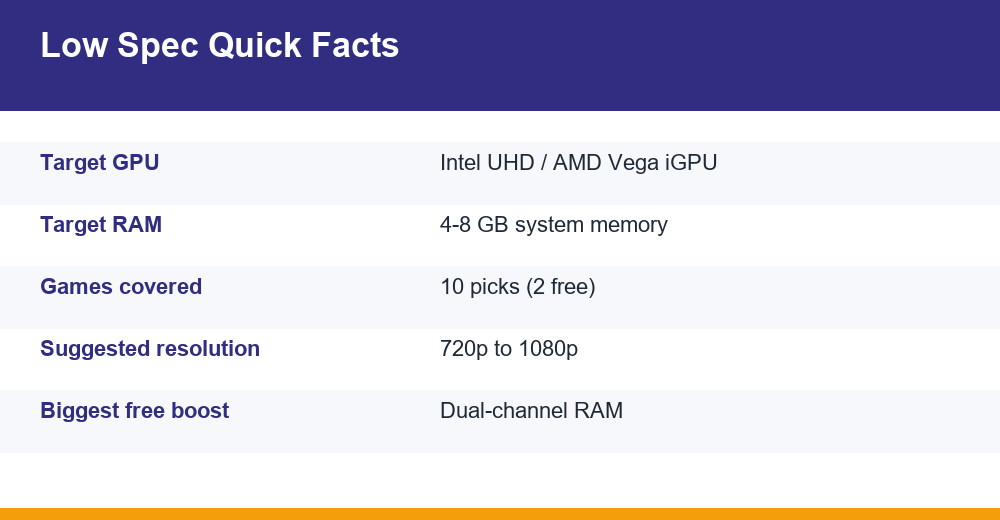
“Low spec” gets thrown around loosely, so here is the definition this guide uses. A low-spec PC has integrated graphics, not a dedicated graphics card, and somewhere between 4 GB and 8 GB of system RAM. That covers most budget laptops, school-issued machines and small office desktops sold over the last several years.
In practice that means one of these two families of graphics:
- Intel UHD Graphics (UHD 600, 620, 630 and similar), found in many Core i3, i5 and i7 laptops and desktops from the late 2010s onward.
- AMD Radeon Vega integrated graphics (Vega 3, 6, 8 and 11), built into Ryzen and Athlon APUs from the same era.
Newer integrated chips such as Intel Iris Xe and AMD’s RDNA-based Radeon graphics are noticeably faster. If you have one, every game below will run more comfortably and you can raise settings. The Steam Deck also uses an AMD APU, which is why handheld-friendly games and low-spec games overlap so much.
The other half of the equation is memory. Integrated graphics borrow part of your system RAM as video memory, so a machine with 4 GB has less room for both the game and Windows. That one detail explains much of why some games stutter on hardware that looks adequate on paper.
The 10 Best Low Spec Games for a Weak PC
So what are the best games for a low-end PC in 2026? These picks were chosen for quality first and hardware demand second. Each one is a game people still talk about and play, not filler added to reach a number. Several are indies with stylized 2D art, which ages well and puts little load on a weak GPU.
Taken together, these are the best low spec games we would recommend to anyone stuck on integrated graphics, covering farming, action, platforming, card games and competitive multiplayer.
1. Stardew Valley
The farming-and-friendship sim is about as light as modern games get. Its pixel art barely registers on integrated graphics, and it runs well even on machines that struggle with heavy web pages. Free updates and co-op support give it real longevity, and it is one of the safest purchases for any older laptop.
2. Hades
Supergiant’s action roguelike looks hand-painted but is well optimized. On Intel UHD or Vega graphics it is playable at 720p or 1080p with modest settings, and the combat stays readable. If you enjoy its loop of runs and upgrades, our roundup of the best roguelike games has more in the same vein, many of them equally light.
3. Hollow Knight
A huge, atmospheric metroidvania with tight controls and a striking 2D style. It is very forgiving on weak hardware and is one of the best value-for-money games on PC. The original game is lighter than its 2025 sequel, Silksong, so start here on older machines.
4. Terraria
Digging, building, boss fights and co-op, all in 2D. Terraria’s game logic runs at a fixed 60 updates per second, and the visuals are simple enough that most integrated GPUs keep up. Very large builds and busy multiplayer worlds load the CPU more than the graphics.
5. Slay the Spire
The deckbuilding roguelike that launched a genre. It is turn-based, so frame rate barely matters, and it runs on almost any Windows laptop. It is ideal for short sessions on a machine with only 4 GB of RAM.
6. Vampire Survivors
Simple to learn and dangerously moreish. The early minutes of a run are trivially light. Late in a run, hundreds of enemies and effects can push a weak CPU, so lower the visual effects in the options if you notice slowdown.
7. Balatro
A poker-themed roguelike deckbuilder that became a surprise hit in 2024. Its card-table presentation is light, play is turn-based, and it works on low-end laptops and handhelds alike. The screen-shake and CRT effects can be turned down in the settings.
8. Celeste
A precision platformer with a heartfelt story and an excellent soundtrack. It needs a stable frame rate for its tight jumps, and integrated graphics deliver that comfortably. A controller helps, but keyboard play works fine.
9. Dota 2
Valve’s free MOBA scales down well. With most effects off and resolution lowered, it is playable on many integrated GPUs, although large team fights demand more than laning does. Expect to spend some time in the video settings to find a stable balance.
10. League of Legends
Riot’s long-running MOBA has always targeted modest PCs, and it remains one of the easiest competitive games to run on integrated graphics. It is free to play, with optional cosmetic purchases.
Suggested Settings and Approximate Frame Rates
The table below gives a starting point for each game on a typical machine with Intel UHD 620 or AMD Vega 8 graphics and 8 GB of dual-channel RAM. The frame rates are approximate expectations based on how demanding each game is, not lab results. Your numbers will vary with CPU, drivers, cooling and memory setup.
| Game | Price model | Suggested setup | Approx. FPS (UHD 620 / Vega 8) | 4 GB RAM friendly? |
|---|---|---|---|---|
| Stardew Valley | Paid | 1080p, default | About 60 | Yes |
| Hades | Paid | 720p-1080p, low/medium | About 40-60 | Usable, tight |
| Hollow Knight | Paid | 1080p, default | About 50-60 | Yes |
| Terraria | Paid | 1080p, lighting reduced | About 50-60 | Yes |
| Slay the Spire | Paid | 1080p, default | About 60 | Yes |
| Vampire Survivors | Paid | 1080p, effects reduced | About 30-60 (late runs dip) | Yes |
| Balatro | Paid | 1080p, CRT/shake reduced | About 60 | Yes |
| Celeste | Paid | 1080p, default | About 60 | Yes |
| Dota 2 | Free | 720p, low, effects off | About 30-60 | Tight |
| League of Legends | Free | 1080p low or 720p medium | About 50-60+ | Usable, tight |
“Tight” means the game will start and run, but with a browser, chat app and Windows background tasks open you may see stutter. Close everything else before playing on a 4 GB machine.
On AMD Vega systems, performance depends heavily on memory speed and channel count. Two matched sticks of RAM can make a bigger difference than any in-game setting, which is why even the best low spec games can feel sluggish on a single-stick laptop.
Free Games That Run on Low-End Hardware
If your budget matches your hardware, there is plenty to play for nothing. Two of the ten picks above, Dota 2 and League of Legends, are already free. A few other long-running free options also suit integrated graphics:
- Team Fortress 2: Valve’s class-based shooter dates from 2007 and runs on very modest graphics at low settings.
- Dota 2 and League of Legends: the two biggest MOBAs, both tunable down to low-end laptops.
- Free demos: Steam Next Fest and regular store demos let you test a game on your own hardware before buying, which is the most reliable compatibility check there is.
Free-to-play shooters built on newer engines are a mixed bag. Some offer a performance mode for weaker hardware, while others assume a dedicated GPU. Our list of the best free-to-play games of 2026 covers each in more detail; check a game’s minimum requirements against your hardware before downloading tens of gigabytes.
A useful habit: look at the minimum graphics line on a store page, not just the RAM figure. If it names a dedicated card from the last few years, an integrated GPU will probably fall short.
What Games Can You Play Without a Graphics Card?
Strictly speaking, every PC has graphics hardware. What people usually mean is a computer with no separate graphics card. On those machines you can comfortably play 2D indies, turn-based strategy, card games, older 3D titles and most MOBAs. Everything in the top ten falls into one of those groups.
The games to avoid are recent big-budget 3D releases built around a dedicated GPU, particularly open-world games and those that require ray tracing. Many of them will not reach a playable frame rate on integrated graphics even at the lowest settings.
Can Integrated Graphics Run Modern Games?
Some, yes. Older chips like Intel UHD 620 and Vega 8 can run modern indies and well-optimized competitive games, but not most new AAA releases. Newer integrated graphics are a different story: recent AMD APUs, like the one in the Steam Deck, can handle many current games at reduced resolution and settings.
A good rule of thumb is that anything rated Steam Deck Verified has been checked to run acceptably on an AMD APU. That is not a guarantee for older laptop chips, but it is a strong hint. Our guide to the best Steam Deck games is a useful shortlist of titles that run well on modest, power-limited hardware.
What Games Run on 4GB RAM?
With 4 GB of RAM, stick to light 2D and turn-based games: Stardew Valley, Terraria, Slay the Spire, Celeste, Hollow Knight, Balatro and Vampire Survivors are all good bets. Remember that integrated graphics take part of that memory, so Windows and the game share less than 4 GB in practice.
If you can upgrade, going from 4 GB to 8 GB (ideally as two matched sticks) is the single most effective improvement for an older laptop, both in games and in everyday use. Check first whether your laptop’s memory is soldered, since many thin models cannot be upgraded.
How to Improve FPS on a Low-End PC
Before blaming the hardware, work through these steps in order. The first few cost nothing and often deliver the biggest gains.
- Plug in the charger. Many laptops throttle the CPU and GPU heavily on battery.
- Set Windows to its best-performance power mode while gaming, and leave Game Mode switched on.
- Update graphics drivers directly from Intel or AMD; laptop makers’ bundled drivers are often years old.
- Close background apps, especially browsers, launchers and chat apps, which eat RAM that integrated graphics need.
- Lower the resolution before anything else. Dropping from 1080p to 720p cuts the pixel count by more than half and helps integrated GPUs more than any single quality setting.
- Turn off shadows, anti-aliasing and post-processing, usually the heaviest settings in a game.
- Cap the frame rate to a steady 30 or 60 so the laptop does not overheat and throttle.
- Check dual-channel memory. A single RAM stick halves the memory bandwidth that integrated graphics depend on.
Cooling matters too. Integrated chips share a cooler with the CPU, and a laptop with dusty vents will slow itself down within minutes. Raising the rear of the laptop and cleaning the vents can restore lost performance.
Finally, turn on an FPS counter (Steam has one in its in-game overlay settings) so you can see whether each change actually helps instead of guessing.
How to Choose the Best Low Spec Games for Your Machine
Lists are a starting point, but your exact machine decides what works. When you are weighing up the best low spec games for your own setup, these checks will save money and frustration:
- Know your hardware. In Windows, Task Manager’s Performance tab shows your GPU name and how much RAM you have.
- Compare against the minimum line on the official store page, focusing on the graphics requirement.
- Favour 2D, turn-based and stylized games, which hold up best on integrated graphics.
- Use refund windows sensibly. Steam accepts refund requests for games played under two hours within 14 days of purchase, which leaves time to test performance.
- Try demos and free weekends whenever they appear.
The good news is that a weak PC no longer means a weak library. Many of the most acclaimed games of the past decade, from Hades to Balatro, run happily on hardware that cannot touch the latest blockbusters. Start with the best low spec games above, tune the settings, and you will have far more to play than time to play it.
Frequently Asked Questions
What games can I play without a graphics card?
On a PC with only integrated graphics you can comfortably play 2D indies, turn-based and card games, older 3D titles and most MOBAs. Good examples are Stardew Valley, Hades, Hollow Knight, Terraria, Slay the Spire, Balatro, Dota 2 and League of Legends. Recent open-world AAA games built for dedicated GPUs are generally out of reach.
Can integrated graphics run modern games?
Older chips like Intel UHD 620 and AMD Vega 8 handle modern indies and well-optimized competitive games, but not most new AAA releases. Newer integrated graphics, like the AMD APU in the Steam Deck, are far more capable and run many current games at lower resolution and settings.
What games run on 4GB RAM?
Light 2D and turn-based games are the safest choice with 4 GB of RAM, for example Stardew Valley, Terraria, Slay the Spire, Celeste, Hollow Knight, Balatro and Vampire Survivors. Integrated graphics use part of that memory, so close browsers and other apps before playing to avoid stutter.
How do I improve FPS on a low end PC?
Plug in your laptop, use a high-performance power mode and update graphics drivers from Intel or AMD. Close background apps, drop the resolution to 720p, and turn off shadows and anti-aliasing. Making sure your RAM runs in dual-channel mode can also give integrated graphics a large boost.